
Boardera Platform API Documentation
This documentation provides detailed instructions for using the Boardera Platform API. If you are a Boardera Development Partner looking to integrate with our platform, you're in the right place! Using this API, you will be able to create PCB bare board and assembly projects, benefit from our automated project analysis, export comprehensive product data — including bare board specs, assembly details, BOM, and pricing — for use in your own systems, and retrieve estimated pricing directly from participating manufacturers.
API Endpoints
https://api.boardera.io/api/v1Headers
# Please define this header in each call as authentication
X-Boardera-Key: <YOUR_API_KEY>
Version
Oct-2026-2
Schema Version
2026-05
Getting Started
To get started, register for an API key through our self-service portal at boardera.io. Most use cases can be onboarded directly through the portal; if you have questions or need an evaluation for a more involved integration, contact us at api.sales@boardera.io.
Get Your API Key
After signing up at boardera.io, you can generate and manage your API keys directly from the portal. Authentication with our API is simple - provide the API Key with every call in the X-Boardera-Key header. We highly recommend making all API calls server-side to protect this secret information, which allows for creation of projects on your behalf.
Discovering the Schema
GraphQL introspection (__schema / __type queries) is disabled on the API. To fetch the schema — for codegen, editor autocomplete, or an AI agent of your own — call the schema endpoint with the same credentials you use for the API:
# SDL (default)
curl -H "X-Boardera-Key: " https://api.boardera.io/api/v1/schema
# Standard introspection JSON (what buildClientSchema, GraphiQL and monaco-graphql accept)
curl -H "X-Boardera-Key: " "https://api.boardera.io/api/v1/schema?format=json"
Both formats carry field, argument, and type descriptions, and the @agent directive (hidden / hint) that gives AI agents guidance beyond the human-facing description; in the JSON format it appears as an extensions.agent object on each annotated field. The response echoes the X-Boardera-Schema-Version you resolved to, so the schema you fetch is the one you will be served. Requests to this endpoint do not count against your token allowance.
Typical Workflow
A typical integration with the Boardera API follows these steps:
- Once a user is ready to send their PCB project files to Boardera, call the createProject function. Save the returned project _id — you'll need it for every subsequent step.
- Generate per-file upload policies using the getFileUploadPolicies function, then use those policies to upload the project's design files (ODB++ or Gerber), BOM, and any other supporting files directly to our S3 bucket. The BOM is uploaded through the same flow by indicating its file type as "BOM".
- Initiate project analysis by calling the analyzeProject function; you can poll this function to find out when the analysis is complete (please leave at least half second delays between checks).
- Once analysis is complete, call the exportProduct function to retrieve the full product export — bare board specs, assembly options, BOM details, pad/trace data, drill data, stackup, file notes, provenance, and (where applicable) pricing. Like analyzeProject, this is a polled operation: exportProduct returns a job reference, which you then poll using getExportProductJob until the export is complete (again, please leave at least half second delays between checks).
Connect Your AI Assistant (MCP)
Boardera hosts a remote Model Context Protocol (MCP) server that exposes the Decode workflow as tools your AI assistant can call directly — create a project, upload design files, run analysis, and pull back the costed export as a conversation, with no client code to write.
Endpoint: https://boardera.io/mcp (streamable HTTP, remote only — there is no local/stdio package).
Supported clients: Claude (web, desktop, mobile), ChatGPT, Cursor, and any MCP client supporting streamable HTTP with OAuth. Add the endpoint as a custom connector; the client registers itself automatically.
Signing in: the first connection opens a Boardera sign-in and consent page in your browser. Approving it links the assistant to your Boardera account. Your long-lived API key is never shared with the assistant — sessions use short-lived tokens that refresh automatically, and you can revoke access by disconnecting the server in your assistant. Tool usage meters against the same token allowance as the rest of your plan; see boardera.io/pricing for plan limits.
Tools
Most tools are generated from this API's schema: every query and mutation documented on this page, except the few marked internal-only for agents, is available as decode_<operation_name> in snake case (for example createProject is decode_create_project, getProject is decode_get_project, analyzeProject is decode_analyze_project, getDFM is decode_get_dfm, exportProduct is decode_export_product). Each takes the operation's arguments as inputs, carries the operation's description, and returns the operation's fields; pass selection (a GraphQL selection set) to choose fields. New API operations appear as tools on the next release with no change on your side.
| Tool | Purpose and inputs |
|---|---|
boardera_account_status |
Confirm the connection: account name, email, subscription status, API readiness, data region, and current-month token usage vs. allowance. No inputs. |
decode_upload_files |
Open an inline drop zone in the chat for a project's design files; also returns a single-use hosted upload link as fallback. Analysis starts automatically. |
decode_upload_files_from_urls |
Attach files from https URLs (url, path, optional type per file). Analysis starts automatically. |
decode_costing_summary |
Chat-sized costed summary of exportProduct: unit price, order total, PCB/assembly/BOM subtotals, top cost drivers, key specs, BOM stats. Inputs: productId (= projectId), optional quantity and manufacturerId. Re-call with other quantities to compare price breaks. |
decode_bom_review |
BOM line items from exportProduct with lifecycle, RoHS/REACH, and sourcing flags plus a whole-BOM risk rollup. Inputs: productId (= projectId), optional offset/limit for very large BOMs. |
decode_explore_api |
Browse this API from the assistant: every operation with arguments and guidance, or one type's fields. Optional input: typeName. Costs no tokens. |
decode_query_api |
Run a read-only GraphQL query of your own as the connected account; the query is validated against the schema first. Inputs: query, optional variables. |
decode_<operation_name> |
One tool per API query and mutation, generated from the schema (see above). Polling follows the operation's own guidance, e.g. re-call decode_analyze_project until analysis.complete is true, and decode_retrieve_dfm until the DFM job completes. |
Uploading files from chat
Where the host renders inline MCP apps (Claude and ChatGPT both do), decode_upload_files shows a drop zone right in the conversation — drop Gerbers, a BOM, or a whole folder and analysis runs automatically. On hosts without inline apps, the same tool returns a single-use hosted upload link (valid 10 minutes) that opens the Boardera upload page for the project. If the files are already hosted, the assistant can use decode_upload_files_from_urls instead.
Quickstart
- Add
https://boardera.io/mcpas a connector in your assistant and approve the Boardera sign-in. - Ask "check my Boardera connection" — the assistant calls
boardera_account_status. - Ask "create a Decode project for 25 boards called Sensor Rev B and let me upload the design".
- Drop your design files in the drop zone (or share a link to a hosted zip). Analysis runs automatically.
- Ask "what's driving the price?" — the assistant calls
decode_costing_summaryand answers from the unit price, subtotals, and top cost drivers. For the complete line-item dataset, ask for the full export.
Other prompts that exercise the tools: "compare pricing at qty 100, 500, and 1000" (decode_costing_summary once per quantity), "does the extracted spec match my design?" (decode_get_project), "any end-of-life or non-RoHS parts in the BOM?" (decode_bom_review), "flag the DFM issues" (decode_get_dfm), "list my recent projects" (decode_list_projects), and anything else this API answers: the assistant looks it up with decode_explore_api and fetches it with decode_query_api.
Using Pricing Display (Enterprise Custom Plan)
You can use our Pricing Display when you want your users to go from the project they have in your application to the online store of the manufacturer of their choice.
Using our API, you will be able to price a project accross different manufacturers, using functions like getManufacturers and getProjectPrices.
An example of our Pricing Display UI is the following: 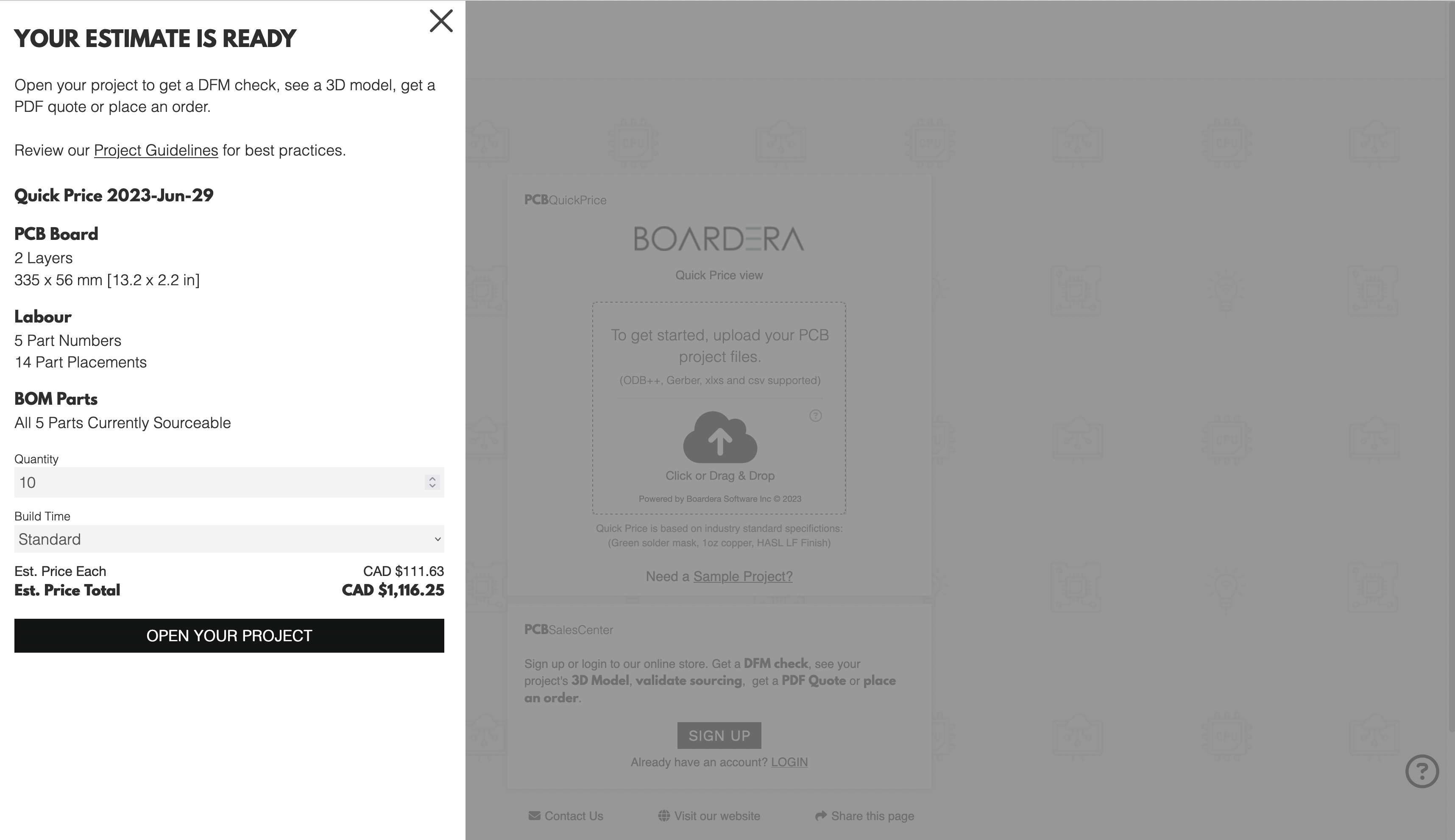
As seen, it lets your users tweak the quantity and build time for their project, and have an updated pricing in real time for the manufacturer of their choice. It also gives them other information such as the dimensions of the board or number of BOM parts that are available.
Integrating with it
- Please load our Javascript helper in your application, using the following script tag:
<script type="text/javascript" src="https://cdn.boardera.io/pcbqp.js"/> - To open the Pricing Display, you will need to have a token. You can request it by calling the mutation openProject, passing it the project id, and the manufacturer id your user selected.
- After retrieving the token, you can call the client-side global function consumeBoarderaCopyToken, which will open the Pricing Display.
The follwing is a code snippet for the last step:
// client-side
const token = '....';
window.consumeBoarderaCopyToken(token);
Queries
alive
Response
Returns a Boolean!
Example
Query
query alive {
  alive
}
Response
{"data": {"alive": false}}
dfmEntryImage
Description
Kick off (or return the existing job for) a composite-image render of one SpeedDFM violation, identified by (productId, x, y). Same render the DfmResultEntry.image field resolver produces — separate top-level query so a client can request the tile only when the user opens a specific marker instead of paying for every marker up front.
Returns null when the coordinates are invalid, the project is not accessible to the caller, or DFM is not enabled for this consumer or vendor.
Poll retrieveAsset with assetExportJobId to fetch the rendered PNG when ready.
Response
Returns an AssetExportJobReference
Example
Query
query dfmEntryImage(
  $y: Float!,
  $x: Float!,
  $productId: String!
) {
  dfmEntryImage(
    y: $y,
    x: $x,
    productId: $productId
  ) {
    assetExportJobId
  }
}
Variables
{
  "y": 123.45,
  "x": 987.65,
  "productId": "abc123"
}
Response
{
  "data": {
    "dfmEntryImage": {
      "assetExportJobId": "xyz789"
    }
  }
}
exportProduct
Description
Export a product including bare board specs, assembly options, BOM details, pad/trace data, drill data, stackup, file notes, and provenance.
Kicks off pricing (if applicable) and returns a job reference. If pricing is already cached, the export completes immediately and status is "completed". Otherwise status is "processing" — poll with getExportProductJob.
Scoped consumers receive pricing automatically from their linked manufacturer. Non-scoped consumers can include pricing by providing a manufacturerId from their manufacturer network (see getManufacturers). If manufacturerId is omitted, non-scoped consumers receive design data only.
Pricing a project created with createProject requires design files attached by analyzeProject. Until then it returns ANALYSIS_NOT_COMPLETE instead of a price for the default specification the project starts with.
To receive costing, either select it in this kickoff query or omit data entirely (the typical two-phase kickoff that selects only { jobId status }). A kickoff that selects data without costing is treated as a design-only request and pricing is skipped.
Response
Returns an ExportProductJobResponse!
Arguments
| Name | Description |
|---|---|
manufacturerId - Int
|
Optional manufacturer ID for non-scoped consumers. When provided, pricing from this manufacturer is included in the export. The manufacturer must be in your network (see getManufacturers). Ignored for scoped consumers. |
quantity - Int
|
|
productId - String!
|
Example
Query
query exportProduct(
  $manufacturerId: Int,
  $quantity: Int,
  $productId: String!
) {
  exportProduct(
    manufacturerId: $manufacturerId,
    quantity: $quantity,
    productId: $productId
  ) {
    jobId
    status
    data {
      meta {
        schemaVersion
        generatedAt
        supplierName
      }
      kind
      productId
      partNumber
      specs {
        industrySector
        ipcClassIII
        bareBoard {
          customerSupplied
          hasLayerFiles
          boardThickness {
            value
            unit
          }
          numOfLayers
          boardWidth {
            value
            unit
          }
          boardLength {
            value
            unit
          }
          copperThickness {
            value
            unit
          }
          layersCuThickness {
            value
            unit
          }
          material
          materialOtherText
          finishing
          finishingOtherText
          hdi
          controlledDepthDrilling
          goldFingers
          customStackup
          viaPlugging
          solderMaskColor
          solderMaskColorOtherText
          silkscreenColor
          silkscreenColorOtherText
          layerFilesNotRequired
          electricalTesting
          controlledImpedance
          blindAndBuriedVias
          panel {
            panelWidth {
              ...ExportValueWithUnitFragment
            }
            panelLength {
              ...ExportValueWithUnitFragment
            }
            designFilesArePanel
            boardsPerAsmPanel
          }
          construction
          regions {
            id
            regionType
            scopedLayers
            bounds {
              ...ExportRegionBoundsFragment
            }
          }
          transitions {
            id
            rigidRegionId
            flexRegionId
          }
          stackup {
            id
            order
            kind
            fileType
            copperLayerNumber
            copperWeightOz
            thicknessMm
            material
            dielectricType
          }
        }
        assemblyOptions {
          conformalCoating
          functionalTesting
          xRayInspection
          firstArticleInspection
          bedOfNailsTesting
          inBoardProgramming
          automatedOpticalInspection
          other
          otherText
        }
        projectBom {
          id
          partNumber
          pricedPartNumber
          partManufacturer
          internalPartNumber
          customerPartNumber
          mfrIdentifier
          customerIdentifier
          mountType
          assemblyLabor
          description
          notes
          potentialPackage
          sourcingOption
          sourcingStatus
          substitutions
          lineNote
          referenceDesignators {
            designator
            dnp
          }
          quantityPerBoard
          customerSupplied
          lifeCycleStatus
          lifeCycleStatusRaw
          rohsStatus
          rohsStatusRaw
          reachStatus
          reachStatusRaw
          rohsCompliant
          reachCompliant
          countryOfOrigin
          minimumOrderQuantity
          itemClass
          leadCount
          lastPricingUpdate
        }
        stackup {
          type
          fileType
          typeIndex
          circuitBoardLayerNumber
          copperThickness {
            value
            unit
          }
          dielectricType
          dielectricThickness {
            value
            unit
          }
          plated
          drillSpanStart
          drillSpanEnd
          fileName
        }
        layerFileMapping {
          fileType
          layerName
          circuitBoardLayerNumber
          fileName
          maskArtwork
        }
        padTraceData {
          layers {
            layerName
            fileName
            circularPadCount
            rectangularPadCount
            totalPadCount
            minPadSurfaceArea {
              ...ExportValueWithUnitFragment
            }
            maxPadSurfaceArea {
              ...ExportValueWithUnitFragment
            }
            totalPadSurfaceArea {
              ...ExportValueWithUnitFragment
            }
            traceCount
            minTraceWidth {
              ...ExportValueWithUnitFragment
            }
            maxTraceWidth {
              ...ExportValueWithUnitFragment
            }
            uniqueTraceWidths
            minSpacing {
              ...ExportValueWithUnitFragment
            }
            copperArea {
              ...ExportValueWithUnitFragment
            }
          }
          totalPadCount
          totalTraceCount
          minSpacing {
            value
            unit
          }
          totalCopperArea {
            value
            unit
          }
        }
        drillData {
          drillFiles {
            drillDescription
            fileName
            holeCount
            minHoleDiameter {
              ...ExportValueWithUnitFragment
            }
            maxHoleDiameter {
              ...ExportValueWithUnitFragment
            }
            totalHoleSurfaceArea {
              ...ExportValueWithUnitFragment
            }
            drillKind
          }
          totalHoleCount
          holeDensity {
            value
            unit
          }
          throughHoleCount
          slotCount
          backDrillCount
          microViaCount
          blindBuriedCount
          mountingCount
          unknownDrillCount
        }
        fileNotes {
          text
          cleanedText
          foundIn {
            fileName
          }
        }
        fileTables {
          table
          foundIn {
            fileName
          }
        }
        provenance {
          areas {
            area
            entries {
              ...ExportProvenanceEntryFragment
            }
          }
          totalDecisions
        }
        overrides {
          property
          bomItemId
          extractedValue
        }
      }
      costing {
        scenarios {
          id
          name
          quantity
          buildTime
          panelizeBoards
          countryOfOrigin
          pricingLineItems {
            itemId
            group
            name
            multiplier
            cost {
              ...MoneyFragment
            }
            markupPercent
            markupValue {
              ...MoneyFragment
            }
            listPrice {
              ...MoneyFragment
            }
            listMargin
            margin
            listGrossProfit {
              ...MoneyFragment
            }
            grossProfit {
              ...MoneyFragment
            }
            discountPercent
            discountValue {
              ...MoneyFragment
            }
            isCustom
            details
            qty
            moq
            attrition
            orderQuantity
            unitPrice {
              ...MoneyFragment
            }
            unitSellPrice {
              ...MoneyFragment
            }
            total {
              ...MoneyFragment
            }
            totalSellPrice {
              ...MoneyFragment
            }
            customerSupplied
            specs {
              ...ExportPricingLineItemSpecsFragment
            }
          }
          projectCalculations {
            name
            value
          }
          calculations {
            name
            floatValue
            booleanValue
          }
          assemblyUnitPrice {
            value
            formatted
            currency
          }
          profitProjections {
            type
            mfrCost {
              ...MoneyFragment
            }
            markup
            listMargin
            margin
            listGrossProfit {
              ...MoneyFragment
            }
            grossProfit {
              ...MoneyFragment
            }
            listPrice {
              ...MoneyFragment
            }
            discountPercentage
            discountValue {
              ...MoneyFragment
            }
            price {
              ...MoneyFragment
            }
            overheadFactoredCost {
              ...MoneyFragment
            }
            landingValue {
              ...MoneyFragment
            }
            overheadFactor
            unpriced
          }
          validationDetails {
            bareBoardValidationSummary {
              ...ExportValidationSummaryFragment
            }
            assemblyValidationSummary {
              ...ExportValidationSummaryFragment
            }
            bomValidationSummary {
              ...ExportBomValidationSummaryFragment
            }
            bareBoardValidationIssues {
              ...ExportBareBoardValidationIssueFragment
            }
            assemblyWithSubstitutions {
              ...ExportAssemblySubstitutionFragment
            }
            assemblyPlacementIssues {
              ...ExportAssemblyPlacementIssueFragment
            }
          }
          subtotal
          unitPrice
          pcbSubtotal
          assemblySubtotal
          bomSubtotal
        }
      }
    }
    warnings {
      code
      message
    }
    errors {
      ... on ErrorExportProductNotFound {
        code
        message
      }
      ... on ErrorExportSupplierNotFound {
        code
        message
      }
      ... on ErrorExportFailed {
        code
        message
      }
      ... on ErrorExportInvalidQuantity {
        code
        message
      }
      ... on ErrorAnalysisNotComplete {
        code
        message
      }
      ... on ErrorJobNotFound {
        code
        message
      }
      ... on ErrorAccessDenied {
        code
        message
      }
    }
  }
}
Variables
{
  "manufacturerId": 987,
  "quantity": 987,
  "productId": "abc123"
}
Response
{
  "data": {
    "exportProduct": {
      "jobId": "xyz789",
      "status": "xyz789",
      "data": ExportProduct,
      "warnings": [ApiWarning],
      "errors": [ErrorExportProductNotFound]
    }
  }
}
exportQuote
Description
Export a full quote as JSON, including all line items, pricing breakdowns, BOM details, and profit projections.
Kicks off pricing for all line items and returns a job reference. If all pricing is cached, the export completes immediately. Otherwise poll with getExportQuoteJob.
This query is only available to scoped API consumers (manufacturer-scoped). The quote must belong to the API consumer's vendor.
To receive costing, either select it in this kickoff query or omit data entirely (the typical two-phase kickoff that selects only { jobId status }). A kickoff that selects data without costing is treated as a design-only request and pricing is skipped.
Response
Returns an ExportQuoteJobResponse!
Arguments
| Name | Description |
|---|---|
quoteHeadId - Int!
|
Example
Query
query exportQuote($quoteHeadId: Int!) {
  exportQuote(quoteHeadId: $quoteHeadId) {
    jobId
    status
    data {
      meta {
        schemaVersion
        generatedAt
        supplierName
      }
      kind
      currency
      quote {
        quoteNumber
        quoteDate
        expiryDate
        customerCompanyName
        mainPOCName
        mainPOCPhone
        mainPOCEmail
        notesAndTerms
        shipTo {
          name
          address1
          address2
          city
          state
          zipCode
          country
        }
        billTo {
          name
          address1
          address2
          city
          state
          zipCode
          country
        }
        subtotal {
          value
          formatted
          currency
        }
        total {
          value
          formatted
          currency
        }
        shipping {
          value
          formatted
          currency
        }
        tax {
          value
          formatted
          currency
        }
        lineItems {
          kind
          lineItemId
          lineNumber
          sku
          productId
          partNumber
          comments
          pricing {
            quantity
            unitPrice {
              ...MoneyFragment
            }
          }
          specs {
            industrySector
            ipcClassIII
            bareBoard {
              ...ExportBareBoardFragment
            }
            assemblyOptions {
              ...ExportAssemblyOptionsFragment
            }
            projectBom {
              ...ExportProjectBomItemFragment
            }
            stackup {
              ...ExportStackupLayerFragment
            }
            layerFileMapping {
              ...ExportLayerFileMappingFragment
            }
            padTraceData {
              ...ExportPadTraceDataFragment
            }
            drillData {
              ...ExportDrillDataFragment
            }
            fileNotes {
              ...ExportFileNoteFragment
            }
            fileTables {
              ...ExportFileTableFragment
            }
            provenance {
              ...ExportProvenanceFragment
            }
            overrides {
              ...ExportProjectOverrideFragment
            }
          }
          costing {
            scenarios {
              ...ExportCostingScenarioFragment
            }
          }
        }
      }
    }
    errors {
      ... on ErrorExportQuoteNotFound {
        code
        message
      }
      ... on ErrorExportSupplierNotFound {
        code
        message
      }
      ... on ErrorExportFailed {
        code
        message
      }
      ... on ErrorJobNotFound {
        code
        message
      }
      ... on ErrorExportNotScopedConsumer {
        code
        message
      }
      ... on ErrorAccessDenied {
        code
        message
      }
    }
  }
}
Variables
{"quoteHeadId": 987}
Response
{
  "data": {
    "exportQuote": {
      "jobId": "xyz789",
      "status": "xyz789",
      "data": ExportQuote,
      "errors": [ErrorExportQuoteNotFound]
    }
  }
}
exportQuoteLineItem
Description
Export a single line item from a quote, including pricing breakdown, BOM details, and profit projections, wrapped with quote context (quote number, currency, dates).
Kicks off pricing and returns a job reference. If pricing is cached, the export completes immediately. Otherwise poll with getExportQuoteLineItemJob.
This query is only available to scoped API consumers (manufacturer-scoped). The quote must belong to the API consumer's vendor.
To receive costing, either select it in this kickoff query or omit data entirely (the typical two-phase kickoff that selects only { jobId status }). A kickoff that selects data without costing is treated as a design-only request and pricing is skipped.
Response
Returns an ExportQuoteLineItemJobResponse!
Example
Query
query exportQuoteLineItem(
  $lineItemId: Int!,
  $quoteHeadId: Int!
) {
  exportQuoteLineItem(
    lineItemId: $lineItemId,
    quoteHeadId: $quoteHeadId
  ) {
    jobId
    status
    data {
      meta {
        schemaVersion
        generatedAt
        supplierName
      }
      kind
      currency
      quote {
        quoteNumber
        quoteDate
        expiryDate
        customerCompanyName
        mainPOCName
        mainPOCPhone
        mainPOCEmail
        notesAndTerms
        shipTo {
          name
          address1
          address2
          city
          state
          zipCode
          country
        }
        billTo {
          name
          address1
          address2
          city
          state
          zipCode
          country
        }
        subtotal {
          value
          formatted
          currency
        }
        total {
          value
          formatted
          currency
        }
        shipping {
          value
          formatted
          currency
        }
        tax {
          value
          formatted
          currency
        }
        lineItems {
          kind
          lineItemId
          lineNumber
          sku
          productId
          partNumber
          comments
          pricing {
            quantity
            unitPrice {
              ...MoneyFragment
            }
          }
          specs {
            industrySector
            ipcClassIII
            bareBoard {
              ...ExportBareBoardFragment
            }
            assemblyOptions {
              ...ExportAssemblyOptionsFragment
            }
            projectBom {
              ...ExportProjectBomItemFragment
            }
            stackup {
              ...ExportStackupLayerFragment
            }
            layerFileMapping {
              ...ExportLayerFileMappingFragment
            }
            padTraceData {
              ...ExportPadTraceDataFragment
            }
            drillData {
              ...ExportDrillDataFragment
            }
            fileNotes {
              ...ExportFileNoteFragment
            }
            fileTables {
              ...ExportFileTableFragment
            }
            provenance {
              ...ExportProvenanceFragment
            }
            overrides {
              ...ExportProjectOverrideFragment
            }
          }
          costing {
            scenarios {
              ...ExportCostingScenarioFragment
            }
          }
        }
      }
    }
    errors {
      ... on ErrorExportQuoteNotFound {
        code
        message
      }
      ... on ErrorExportLineItemNotFound {
        code
        message
      }
      ... on ErrorExportSupplierNotFound {
        code
        message
      }
      ... on ErrorExportFailed {
        code
        message
      }
      ... on ErrorJobNotFound {
        code
        message
      }
      ... on ErrorExportNotScopedConsumer {
        code
        message
      }
      ... on ErrorAccessDenied {
        code
        message
      }
    }
  }
}
Variables
{"lineItemId": 123, "quoteHeadId": 987}
Response
{
  "data": {
    "exportQuoteLineItem": {
      "jobId": "abc123",
      "status": "abc123",
      "data": ExportQuote,
      "errors": [ErrorExportQuoteNotFound]
    }
  }
}
exportSchemaVersions
Description
All supported JSON export schema versions.
Response
Returns [String!]!
Example
Query
query exportSchemaVersions {
  exportSchemaVersions
}
Response
{
  "data": {
    "exportSchemaVersions": ["xyz789"]
  }
}
getDFM
Description
Kick off a SpeedDFM analysis for a project and return a job reference.
If a recent DFM result is already cached for this project's current file set, the job is returned with status: "completed" and data populated immediately. Otherwise status is "processing" — poll with retrieveDFM.
DFM tokens are charged when results are retrieved (see retrieveDFM).
Requires the project to have completed analyzeProject first. Returns ANALYSIS_NOT_COMPLETE if advisors are still running for this project.
Boards whose total layer feature count exceeds the supported maximum (120,000 by default) are rejected up front with DFM_NOT_AVAILABLE and consume no DFM tokens.
Response
Returns a DfmJobResponse!
Example
Query
query getDFM(
  $manufacturerId: Int,
  $productId: String!
) {
  getDFM(
    manufacturerId: $manufacturerId,
    productId: $productId
  ) {
    jobId
    status
    data {
      results {
        ruleId
        ruleName
        ruleType
        severity
        layerName
        layerType
        x
        y
        measuredValue
        threshold
        unit
        description
        image {
          assetExportJobId
        }
      }
      summary {
        fabricationErrorCount
        fabricationWarningCount
        assemblyErrorCount
        assemblyWarningCount
        generalCount
        analysisStatus
      }
      reportUrl {
        assetExportJobId
      }
    }
    errors {
      ... on ErrorExportProductNotFound {
        code
        message
      }
      ... on ErrorProjectNotFound {
        code
        message
      }
      ... on ErrorAnalysisNotComplete {
        code
        message
      }
      ... on ErrorDfmFailed {
        code
        message
      }
      ... on ErrorDfmNotAvailable {
        code
        message
      }
      ... on ErrorExportFailed {
        code
        message
      }
      ... on ErrorJobNotFound {
        code
        message
      }
      ... on ErrorAccessDenied {
        code
        message
      }
    }
  }
}
Variables
{
  "manufacturerId": 123,
  "productId": "abc123"
}
Response
{
  "data": {
    "getDFM": {
      "jobId": "abc123",
      "status": "xyz789",
      "data": DfmResults,
      "errors": [ErrorExportProductNotFound]
    }
  }
}
getExportProductJob
Description
Poll for the result of an exportProduct job.
If pricing has finished since the job was created, the export is completed lazily and status changes to "completed" with the data populated.
If the job's cached pricing result was invalidated before this poll (for example by a manufacturer changing their pricing configuration), pricing is re-run automatically and status stays "processing" until the new result is ready.
Warnings are returned by exportProduct on the initial response, not by this poll endpoint.
Response
Returns an ExportProductJobResponse!
Arguments
| Name | Description |
|---|---|
jobId - String!
|
Example
Query
query getExportProductJob($jobId: String!) {
  getExportProductJob(jobId: $jobId) {
    jobId
    status
    data {
      meta {
        schemaVersion
        generatedAt
        supplierName
      }
      kind
      productId
      partNumber
      specs {
        industrySector
        ipcClassIII
        bareBoard {
          customerSupplied
          hasLayerFiles
          boardThickness {
            value
            unit
          }
          numOfLayers
          boardWidth {
            value
            unit
          }
          boardLength {
            value
            unit
          }
          copperThickness {
            value
            unit
          }
          layersCuThickness {
            value
            unit
          }
          material
          materialOtherText
          finishing
          finishingOtherText
          hdi
          controlledDepthDrilling
          goldFingers
          customStackup
          viaPlugging
          solderMaskColor
          solderMaskColorOtherText
          silkscreenColor
          silkscreenColorOtherText
          layerFilesNotRequired
          electricalTesting
          controlledImpedance
          blindAndBuriedVias
          panel {
            panelWidth {
              ...ExportValueWithUnitFragment
            }
            panelLength {
              ...ExportValueWithUnitFragment
            }
            designFilesArePanel
            boardsPerAsmPanel
          }
          construction
          regions {
            id
            regionType
            scopedLayers
            bounds {
              ...ExportRegionBoundsFragment
            }
          }
          transitions {
            id
            rigidRegionId
            flexRegionId
          }
          stackup {
            id
            order
            kind
            fileType
            copperLayerNumber
            copperWeightOz
            thicknessMm
            material
            dielectricType
          }
        }
        assemblyOptions {
          conformalCoating
          functionalTesting
          xRayInspection
          firstArticleInspection
          bedOfNailsTesting
          inBoardProgramming
          automatedOpticalInspection
          other
          otherText
        }
        projectBom {
          id
          partNumber
          pricedPartNumber
          partManufacturer
          internalPartNumber
          customerPartNumber
          mfrIdentifier
          customerIdentifier
          mountType
          assemblyLabor
          description
          notes
          potentialPackage
          sourcingOption
          sourcingStatus
          substitutions
          lineNote
          referenceDesignators {
            designator
            dnp
          }
          quantityPerBoard
          customerSupplied
          lifeCycleStatus
          lifeCycleStatusRaw
          rohsStatus
          rohsStatusRaw
          reachStatus
          reachStatusRaw
          rohsCompliant
          reachCompliant
          countryOfOrigin
          minimumOrderQuantity
          itemClass
          leadCount
          lastPricingUpdate
        }
        stackup {
          type
          fileType
          typeIndex
          circuitBoardLayerNumber
          copperThickness {
            value
            unit
          }
          dielectricType
          dielectricThickness {
            value
            unit
          }
          plated
          drillSpanStart
          drillSpanEnd
          fileName
        }
        layerFileMapping {
          fileType
          layerName
          circuitBoardLayerNumber
          fileName
          maskArtwork
        }
        padTraceData {
          layers {
            layerName
            fileName
            circularPadCount
            rectangularPadCount
            totalPadCount
            minPadSurfaceArea {
              ...ExportValueWithUnitFragment
            }
            maxPadSurfaceArea {
              ...ExportValueWithUnitFragment
            }
            totalPadSurfaceArea {
              ...ExportValueWithUnitFragment
            }
            traceCount
            minTraceWidth {
              ...ExportValueWithUnitFragment
            }
            maxTraceWidth {
              ...ExportValueWithUnitFragment
            }
            uniqueTraceWidths
            minSpacing {
              ...ExportValueWithUnitFragment
            }
            copperArea {
              ...ExportValueWithUnitFragment
            }
          }
          totalPadCount
          totalTraceCount
          minSpacing {
            value
            unit
          }
          totalCopperArea {
            value
            unit
          }
        }
        drillData {
          drillFiles {
            drillDescription
            fileName
            holeCount
            minHoleDiameter {
              ...ExportValueWithUnitFragment
            }
            maxHoleDiameter {
              ...ExportValueWithUnitFragment
            }
            totalHoleSurfaceArea {
              ...ExportValueWithUnitFragment
            }
            drillKind
          }
          totalHoleCount
          holeDensity {
            value
            unit
          }
          throughHoleCount
          slotCount
          backDrillCount
          microViaCount
          blindBuriedCount
          mountingCount
          unknownDrillCount
        }
        fileNotes {
          text
          cleanedText
          foundIn {
            fileName
          }
        }
        fileTables {
          table
          foundIn {
            fileName
          }
        }
        provenance {
          areas {
            area
            entries {
              ...ExportProvenanceEntryFragment
            }
          }
          totalDecisions
        }
        overrides {
          property
          bomItemId
          extractedValue
        }
      }
      costing {
        scenarios {
          id
          name
          quantity
          buildTime
          panelizeBoards
          countryOfOrigin
          pricingLineItems {
            itemId
            group
            name
            multiplier
            cost {
              ...MoneyFragment
            }
            markupPercent
            markupValue {
              ...MoneyFragment
            }
            listPrice {
              ...MoneyFragment
            }
            listMargin
            margin
            listGrossProfit {
              ...MoneyFragment
            }
            grossProfit {
              ...MoneyFragment
            }
            discountPercent
            discountValue {
              ...MoneyFragment
            }
            isCustom
            details
            qty
            moq
            attrition
            orderQuantity
            unitPrice {
              ...MoneyFragment
            }
            unitSellPrice {
              ...MoneyFragment
            }
            total {
              ...MoneyFragment
            }
            totalSellPrice {
              ...MoneyFragment
            }
            customerSupplied
            specs {
              ...ExportPricingLineItemSpecsFragment
            }
          }
          projectCalculations {
            name
            value
          }
          calculations {
            name
            floatValue
            booleanValue
          }
          assemblyUnitPrice {
            value
            formatted
            currency
          }
          profitProjections {
            type
            mfrCost {
              ...MoneyFragment
            }
            markup
            listMargin
            margin
            listGrossProfit {
              ...MoneyFragment
            }
            grossProfit {
              ...MoneyFragment
            }
            listPrice {
              ...MoneyFragment
            }
            discountPercentage
            discountValue {
              ...MoneyFragment
            }
            price {
              ...MoneyFragment
            }
            overheadFactoredCost {
              ...MoneyFragment
            }
            landingValue {
              ...MoneyFragment
            }
            overheadFactor
            unpriced
          }
          validationDetails {
            bareBoardValidationSummary {
              ...ExportValidationSummaryFragment
            }
            assemblyValidationSummary {
              ...ExportValidationSummaryFragment
            }
            bomValidationSummary {
              ...ExportBomValidationSummaryFragment
            }
            bareBoardValidationIssues {
              ...ExportBareBoardValidationIssueFragment
            }
            assemblyWithSubstitutions {
              ...ExportAssemblySubstitutionFragment
            }
            assemblyPlacementIssues {
              ...ExportAssemblyPlacementIssueFragment
            }
          }
          subtotal
          unitPrice
          pcbSubtotal
          assemblySubtotal
          bomSubtotal
        }
      }
    }
    warnings {
      code
      message
    }
    errors {
      ... on ErrorExportProductNotFound {
        code
        message
      }
      ... on ErrorExportSupplierNotFound {
        code
        message
      }
      ... on ErrorExportFailed {
        code
        message
      }
      ... on ErrorExportInvalidQuantity {
        code
        message
      }
      ... on ErrorAnalysisNotComplete {
        code
        message
      }
      ... on ErrorJobNotFound {
        code
        message
      }
      ... on ErrorAccessDenied {
        code
        message
      }
    }
  }
}
Variables
{"jobId": "abc123"}
Response
{
  "data": {
    "getExportProductJob": {
      "jobId": "xyz789",
      "status": "xyz789",
      "data": ExportProduct,
      "warnings": [ApiWarning],
      "errors": [ErrorExportProductNotFound]
    }
  }
}
getExportQuoteJob
Description
Poll for the result of an exportQuote job.
If all line-item pricing has finished, the export is completed lazily and status changes to "completed" with the data populated.
Any line item whose cached pricing result was invalidated before this poll (for example by a manufacturer changing their pricing configuration) is re-priced automatically, and status stays "processing" until the new result is ready.
Response
Returns an ExportQuoteJobResponse!
Arguments
| Name | Description |
|---|---|
jobId - String!
|
Example
Query
query getExportQuoteJob($jobId: String!) {
  getExportQuoteJob(jobId: $jobId) {
    jobId
    status
    data {
      meta {
        schemaVersion
        generatedAt
        supplierName
      }
      kind
      currency
      quote {
        quoteNumber
        quoteDate
        expiryDate
        customerCompanyName
        mainPOCName
        mainPOCPhone
        mainPOCEmail
        notesAndTerms
        shipTo {
          name
          address1
          address2
          city
          state
          zipCode
          country
        }
        billTo {
          name
          address1
          address2
          city
          state
          zipCode
          country
        }
        subtotal {
          value
          formatted
          currency
        }
        total {
          value
          formatted
          currency
        }
        shipping {
          value
          formatted
          currency
        }
        tax {
          value
          formatted
          currency
        }
        lineItems {
          kind
          lineItemId
          lineNumber
          sku
          productId
          partNumber
          comments
          pricing {
            quantity
            unitPrice {
              ...MoneyFragment
            }
          }
          specs {
            industrySector
            ipcClassIII
            bareBoard {
              ...ExportBareBoardFragment
            }
            assemblyOptions {
              ...ExportAssemblyOptionsFragment
            }
            projectBom {
              ...ExportProjectBomItemFragment
            }
            stackup {
              ...ExportStackupLayerFragment
            }
            layerFileMapping {
              ...ExportLayerFileMappingFragment
            }
            padTraceData {
              ...ExportPadTraceDataFragment
            }
            drillData {
              ...ExportDrillDataFragment
            }
            fileNotes {
              ...ExportFileNoteFragment
            }
            fileTables {
              ...ExportFileTableFragment
            }
            provenance {
              ...ExportProvenanceFragment
            }
            overrides {
              ...ExportProjectOverrideFragment
            }
          }
          costing {
            scenarios {
              ...ExportCostingScenarioFragment
            }
          }
        }
      }
    }
    errors {
      ... on ErrorExportQuoteNotFound {
        code
        message
      }
      ... on ErrorExportSupplierNotFound {
        code
        message
      }
      ... on ErrorExportFailed {
        code
        message
      }
      ... on ErrorJobNotFound {
        code
        message
      }
      ... on ErrorExportNotScopedConsumer {
        code
        message
      }
      ... on ErrorAccessDenied {
        code
        message
      }
    }
  }
}
Variables
{"jobId": "xyz789"}
Response
{
  "data": {
    "getExportQuoteJob": {
      "jobId": "xyz789",
      "status": "abc123",
      "data": ExportQuote,
      "errors": [ErrorExportQuoteNotFound]
    }
  }
}
getExportQuoteLineItemJob
Description
Poll for the result of an exportQuoteLineItem job.
If pricing has finished, the export is completed lazily and status changes to "completed" with the data populated.
If the line item's cached pricing result was invalidated before this poll (for example by a manufacturer changing their pricing configuration), pricing is re-run automatically and status stays "processing" until the new result is ready.
Response
Returns an ExportQuoteLineItemJobResponse!
Arguments
| Name | Description |
|---|---|
jobId - String!
|
Example
Query
query getExportQuoteLineItemJob($jobId: String!) {
  getExportQuoteLineItemJob(jobId: $jobId) {
    jobId
    status
    data {
      meta {
        schemaVersion
        generatedAt
        supplierName
      }
      kind
      currency
      quote {
        quoteNumber
        quoteDate
        expiryDate
        customerCompanyName
        mainPOCName
        mainPOCPhone
        mainPOCEmail
        notesAndTerms
        shipTo {
          name
          address1
          address2
          city
          state
          zipCode
          country
        }
        billTo {
          name
          address1
          address2
          city
          state
          zipCode
          country
        }
        subtotal {
          value
          formatted
          currency
        }
        total {
          value
          formatted
          currency
        }
        shipping {
          value
          formatted
          currency
        }
        tax {
          value
          formatted
          currency
        }
        lineItems {
          kind
          lineItemId
          lineNumber
          sku
          productId
          partNumber
          comments
          pricing {
            quantity
            unitPrice {
              ...MoneyFragment
            }
          }
          specs {
            industrySector
            ipcClassIII
            bareBoard {
              ...ExportBareBoardFragment
            }
            assemblyOptions {
              ...ExportAssemblyOptionsFragment
            }
            projectBom {
              ...ExportProjectBomItemFragment
            }
            stackup {
              ...ExportStackupLayerFragment
            }
            layerFileMapping {
              ...ExportLayerFileMappingFragment
            }
            padTraceData {
              ...ExportPadTraceDataFragment
            }
            drillData {
              ...ExportDrillDataFragment
            }
            fileNotes {
              ...ExportFileNoteFragment
            }
            fileTables {
              ...ExportFileTableFragment
            }
            provenance {
              ...ExportProvenanceFragment
            }
            overrides {
              ...ExportProjectOverrideFragment
            }
          }
          costing {
            scenarios {
              ...ExportCostingScenarioFragment
            }
          }
        }
      }
    }
    errors {
      ... on ErrorExportQuoteNotFound {
        code
        message
      }
      ... on ErrorExportLineItemNotFound {
        code
        message
      }
      ... on ErrorExportSupplierNotFound {
        code
        message
      }
      ... on ErrorExportFailed {
        code
        message
      }
      ... on ErrorJobNotFound {
        code
        message
      }
      ... on ErrorExportNotScopedConsumer {
        code
        message
      }
      ... on ErrorAccessDenied {
        code
        message
      }
    }
  }
}
Variables
{"jobId": "xyz789"}
Response
{
  "data": {
    "getExportQuoteLineItemJob": {
      "jobId": "abc123",
      "status": "xyz789",
      "data": ExportQuote,
      "errors": [ErrorExportQuoteNotFound]
    }
  }
}
getFileUploadPolicies
Description
Allows you to get write policies for the given files so that you can upload them to our Amazon S3 bucket then assign them to a project. Please remember the project needs to be created beforehand and is identified by the required argument projectId. Please refer to createProject if you have not completed this step before.
File structure
Please follow the recommendations in the section ProjectFile to learn more.
Archive support
You can upload .zip, .tar, .tar.gz, .rar, or .7z archives directly. The server extracts them asynchronously and adds the inner files to the project — no client-side decompression needed.
Type detection runs on extracted files: omit type and the server will classify each file (gerber / drill / BOM / ODB++ / other) the same way it does for files uploaded individually.
Limits per archive: 512 MB uncompressed, 500 inner files. Encrypted archives, .bz2, and other formats are rejected with a specific error. Per-file extraction errors surface via analyzeProject's warnings field — the rest of the archive still imports.
For ODB++ projects, you can upload either the ODB .tgz directly or a .zip containing the ODB tarball or the raw ODB folder structure — all three paths produce the same result.
Limits
At this time we have a limit of 500 policies than can be requested for a single project in a timeframe of 60 seconds. If you try to request more policies for a single project during the timeframe, you will be presented with an error message that looks as follows:
    {
        "data": {
            "getFileUploadPolicies": {
                "writePolicies": null,
                "errors": [
                    {
                        "code": "TOO_MANY_UPLOADS_FOR_PROJECT",
                        "message": "Please wait 58 seconds before uploading a new batch of files for this project."
                    }
                ]
            }
        }
    }
Response
Returns a WritePoliciesResponse!
Arguments
| Name | Description |
|---|---|
files - [ProjectFile!]!
|
An array of files you wish to upload for this project. |
projectId - String!
|
Your project id |
Example
Query
query getFileUploadPolicies(
  $files: [ProjectFile!]!,
  $projectId: String!
) {
  getFileUploadPolicies(
    files: $files,
    projectId: $projectId
  ) {
    writePolicies {
      requestId
      policies {
        fileName
        filePath
        policy {
          method
          url
          fields
          headers
        }
      }
    }
    errors {
      ... on ErrorNoFiles {
        code
        message
      }
      ... on ErrorTooManyFiles {
        code
        message
      }
      ... on ErrorMissingProjectId {
        code
        message
      }
      ... on ErrorLimitExceeded {
        code
        message
        statusCode
      }
      ... on ErrorIncorrectFilePath {
        code
        message
      }
      ... on ErrorIncorrectFileName {
        code
        message
      }
      ... on ErrorEmptyFile {
        code
        message
      }
      ... on ErrorFileTypeNotSupported {
        code
        message
      }
      ... on ErrorProjectNotFound {
        code
        message
      }
      ... on ErrorTooManyUploadsProject {
        code
        message
      }
    }
  }
}
Variables
{
  "files": [ProjectFile],
  "projectId": "abc123"
}
Response
{
  "data": {
    "getFileUploadPolicies": {
      "writePolicies": WritePolicies,
      "errors": [ErrorNoFiles]
    }
  }
}
getManufacturers
Description
Allows you to retrieve a list of manufacturers available to you through our API. Use it to get information about their names, ids, PCBSalesCenter online e-commerce urls and if they are available to price PCB-only, Assembly-only or both kinds of jobs.
Response
Returns [GetManufacturersResponse!]!
Arguments
| Name | Description |
|---|---|
types - [String!]
|
A string array of manufacturer types like ['EMS', 'PCB', 'BOTH']. In this context, each type refers to manufacturers that accept each type of job as defined:
This field is nullable so you may not define it in your request to retrieve all the results available. |
ids - [Int!]
|
A numeric array of manufacturer ids like [123, 456, 789]. This field is nullable so you may not define it in your request to retrieve all the results available. |
Example
Query
query getManufacturers(
  $types: [String!],
  $ids: [Int!]
) {
  getManufacturers(
    types: $types,
    ids: $ids
  ) {
    mfrId
    manufacturer {
      _id
      displayName
      type
      products
      pcbSaleCenterUrl
      pcbQuickUrl
      preferredCurrency
      logoUrl
      website
    }
    errors {
      ... on ErrorMfrNotFound {
        code
        message
      }
    }
  }
}
Variables
{"types": ["abc123"], "ids": [987]}
Response
{
  "data": {
    "getManufacturers": [
      {
        "mfrId": 987,
        "manufacturer": Manufacturer,
        "errors": [ErrorMfrNotFound]
      }
    ]
  }
}
getProject
Description
Allows you to retrieve information about a project identified by projectId.
Retrieving prices
Please follow the documentation of the Project type here and check the getPrices field.
Response
Returns a ProjectResponse!
Arguments
| Name | Description |
|---|---|
projectId - String!
|
Your project id |
Example
Query
query getProject($projectId: String!) {
  getProject(projectId: $projectId) {
    project {
      _id
      creationSource
      apiConsumerId
      externalAccountId
      companyName
      name
      designerEmail
      creationDate
      lastModifiedDate
      boardFileType
      editorLink
      technicalDetails {
        version
        materialType
        materialTypeOtherText
        numberOfLayers
        solderMask
        solderMaskOtherText
        finishSurface
        finishSurfaceOtherText
        baseCuThicknessMM
        singlePCBWidthMM
        singlePCBLengthMM
        panelWidthMM
        panelLengthMM
        pcbPerPanel
        IPCClass
        industrySector
        viaPlug
        ctiValue
        materialTg
        peelableSolderMask
        controlledImpedance
      }
      getPrices {
        mfrId
        mfrDisplayName
        price {
          unitPrice
          subtotal
          quantity
          currency
          projectType
        }
        errors {
          ... on ErrorProjectNotFound {
            code
            message
          }
          ... on ErrorCannotPrice {
            code
            message
          }
          ... on ErrorQuoteRequired {
            code
            message
          }
          ... on ErrorPricingDisabled {
            code
            message
          }
          ... on ErrorPricingInProgress {
            code
            message
            retryAfterSeconds
          }
          ... on ErrorMfrNotFound {
            code
            message
          }
        }
      }
      isSample
      sampleFiles
      files {
        name
        type
      }
      pendingUploads
      analysisState
    }
    errors {
      ... on ErrorAccessDenied {
        code
        message
      }
      ... on ErrorMissingProjectId {
        code
        message
      }
      ... on ErrorProjectNotFound {
        code
        message
      }
      ... on ErrorLimitExceeded {
        code
        message
        statusCode
      }
    }
  }
}
Variables
{"projectId": "xyz789"}
Response
{
  "data": {
    "getProject": {
      "project": Project,
      "errors": [ErrorAccessDenied]
    }
  }
}
getProjectPrices
Description
Use it to retrieve project prices for a project. You can specify an optional quantity and manufacturer ids. Please refer to getManufacturers to get more information about how you can retrieve the latter.
Quantity resolution
When quantity is omitted or null, the resolver now uses the project's persisted quantity (set by createProject) before falling back to the platform default of 10. Previously the resolver always defaulted to 10 when the argument was absent. To force the platform default, pass 10 explicitly.
Currencies and conversions
At the time, the prices returned match the preferred currencies of the manufacturers, so for example, if a manufacturer prefers to get paid in USD, the price object returned for this manufacturer in the results will be in USD.
After receiving the information, you may want to filter it in your application, so that you display the most relevant results to your application users.
Response
Returns [PriceResponse!]!
Arguments
| Name | Description |
|---|---|
quantity - Int
|
Falls back to the project's stored quantity, then 10. |
manufacturerIds - [Int!]
|
A numeric array of manufacturer ids like [123, 456, 798]. This field is nullable so you may omit it in your request to retrieve all the results available. |
projectId - String!
|
Your project id |
Example
Query
query getProjectPrices(
  $quantity: Int,
  $manufacturerIds: [Int!],
  $projectId: String!
) {
  getProjectPrices(
    quantity: $quantity,
    manufacturerIds: $manufacturerIds,
    projectId: $projectId
  ) {
    mfrId
    mfrDisplayName
    price {
      unitPrice
      subtotal
      quantity
      currency
      projectType
    }
    errors {
      ... on ErrorProjectNotFound {
        code
        message
      }
      ... on ErrorCannotPrice {
        code
        message
      }
      ... on ErrorQuoteRequired {
        code
        message
      }
      ... on ErrorPricingDisabled {
        code
        message
      }
      ... on ErrorPricingInProgress {
        code
        message
        retryAfterSeconds
      }
      ... on ErrorMfrNotFound {
        code
        message
      }
    }
  }
}
Variables
{
  "quantity": 987,
  "manufacturerIds": [123],
  "projectId": "abc123"
}
Response
{
  "data": {
    "getProjectPrices": [
      {
        "mfrId": 987,
        "mfrDisplayName": "xyz789",
        "price": Price,
        "errors": [ErrorProjectNotFound]
      }
    ]
  }
}
getProjectPricesAsync
Description
Retrieve project prices asynchronously. Kicks off a Temporal pricing workflow for each manufacturer and returns immediately. On a cache hit the price field is populated; on a cache miss a PRICING_IN_PROGRESS error is returned with a retryAfterSeconds hint.
Retry the query after the suggested interval to pick up the cached result.
Currencies and conversions
Prices are returned in each manufacturer's preferred currency.
Example
getProjectPricesAsync(projectId: "abc", quantity: 100) {
    mfrId
    mfrDisplayName
    price { unitPrice subtotal quantity currency projectType }
    errors { ...on ErrorPricingInProgress { code message retryAfterSeconds } }
}
Response
Returns [PriceResponse!]!
Example
Query
query getProjectPricesAsync(
  $quantity: Int,
  $manufacturerIds: [Int!],
  $projectId: String!
) {
  getProjectPricesAsync(
    quantity: $quantity,
    manufacturerIds: $manufacturerIds,
    projectId: $projectId
  ) {
    mfrId
    mfrDisplayName
    price {
      unitPrice
      subtotal
      quantity
      currency
      projectType
    }
    errors {
      ... on ErrorProjectNotFound {
        code
        message
      }
      ... on ErrorCannotPrice {
        code
        message
      }
      ... on ErrorQuoteRequired {
        code
        message
      }
      ... on ErrorPricingDisabled {
        code
        message
      }
      ... on ErrorPricingInProgress {
        code
        message
        retryAfterSeconds
      }
      ... on ErrorMfrNotFound {
        code
        message
      }
    }
  }
}
Variables
{
  "quantity": 123,
  "manufacturerIds": [987],
  "projectId": "abc123"
}
Response
{
  "data": {
    "getProjectPricesAsync": [
      {
        "mfrId": 987,
        "mfrDisplayName": "abc123",
        "price": Price,
        "errors": [ErrorProjectNotFound]
      }
    ]
  }
}
getRFQ
Description
Poll for the status of a submitted RFQ.
After calling submitRFQ, call this query repeatedly until complete is true. At that point, quoteNumber and quoteLink will be populated with the ERP-assigned values.
Recommended polling interval: 1–2 seconds.
Response
Returns an GetRFQResponse!
Arguments
| Name | Description |
|---|---|
quoteId - Int!
|
The quote ID returned by submitRFQ. |
Example
Query
query getRFQ($quoteId: Int!) {
  getRFQ(quoteId: $quoteId) {
    rfq {
      complete
      quoteNumber
      quoteLink
    }
    errors {
      ... on ErrorRFQNotFound {
        code
        message
      }
      ... on ErrorAccessDenied {
        code
        message
      }
    }
  }
}
Variables
{"quoteId": 123}
Response
{
  "data": {
    "getRFQ": {
      "rfq": RFQStatus,
      "errors": [ErrorRFQNotFound]
    }
  }
}
getTokenUsage
Description
Returns token usage for the current API consumer's billing period. Defaults to the current month. Optionally pass year and month to query a specific period.
Response
Returns a TokenUsageResponse!
Example
Query
query getTokenUsage(
  $month: Int,
  $year: Int
) {
  getTokenUsage(
    month: $month,
    year: $year
  ) {
    data {
      totalTokens
      monthlyTokensIncluded
      billingPeriodStart
      billingPeriodEnd
      breakdown {
        projects
        copperLayers
        bomParsing
        projectPricing
        bomPricing
        designNotesAnalyzed
        dfm
        aiChat
      }
      tokenUsageHistory {
        productId
        action
        tokens
        date
      }
    }
    errors {
      ... on ErrorInvalidBillingPeriod {
        code
        message
      }
      ... on ErrorTokenUsageFetchFailed {
        code
        message
      }
    }
  }
}
Variables
{"month": 123, "year": 987}
Response
{
  "data": {
    "getTokenUsage": {
      "data": TokenUsageData,
      "errors": [ErrorInvalidBillingPeriod]
    }
  }
}
layerFileMap
Description
Returns the full gerber-file → PCB-layer mapping for a product: for each assigned layer file, its layer role, layer number (where applicable), and the assigned gerber file name. Covers copper, silk, mask, paste, drill, outline, and mechanical.
fileName is null when the file record is missing or unnamed (e.g. a legacy product). Returns null when the project is not accessible to this consumer, export functions are disabled, or the export mask excludes bareBoard. A product with no layer files returns an empty layers array.
This is the same mapping surfaced in the JSON export under specs.layerFileMapping.
Response
Returns a LayerFileMapResponse
Arguments
| Name | Description |
|---|---|
productId - String!
|
Example
Query
query layerFileMap($productId: String!) {
  layerFileMap(productId: $productId) {
    layers {
      fileType
      layerName
      circuitBoardLayerNumber
      fileName
      maskArtwork
    }
  }
}
Variables
{"productId": "abc123"}
Response
{
  "data": {
    "layerFileMap": {"layers": [ExportLayerFileMapping]}
  }
}
layerMeshes
Description
Kick off (or return the existing job for) a per-layer 3D mesh export of a product's board — one binary glTF ("gltf") mesh per rendered board layer (copper, mask, silk) plus the synthesized board-core ("dielectric") layer.
Returns null when the project is not accessible to this consumer, export functions are disabled for this consumer, the export mask excludes bareBoard, or the project has no layer files yet (run analyzeProject first).
Poll retrieveAsset with assetExportJobId. When status is "completed", read layers — this assetType does not populate url/contentType.
Response
Returns an AssetExportJobReference
Arguments
| Name | Description |
|---|---|
productId - String!
|
Example
Query
query layerMeshes($productId: String!) {
  layerMeshes(productId: $productId) {
    assetExportJobId
  }
}
Variables
{"productId": "xyz789"}
Response
{
  "data": {
    "layerMeshes": {
      "assetExportJobId": "abc123"
    }
  }
}
listProjects
Description
Lists projects visible to the authenticated API consumer, as id + display name. Use the returned projectIds with getProject to fetch full project details.
Scoping
- Scoped manufacturer consumers with Full Domain Access see every project for their vendor (web-UI + API).
- All other consumers see only projects they themselves created via the API.
Archived projects are excluded.
Sorting
sortBy selects the order:
creationDate(default) — newest-created first. Backwards-compatible default for existing callers.lastModifiedDate— most-recently-touched first. Projects that have never been modified sort to the end.
Pagination
Page size is bounded server-side. The response includes nextCursor — an opaque token — that you pass back as after on the next call to continue. nextCursor: null means you reached the last page. Order is stable (sort field desc, _id desc tiebreaker) so a page boundary won't double-count or skip projects. Cursors are tied to the sortBy they were produced under; switching sortBy mid-pagination is undefined and the cursor should be discarded.
Response
Returns a ListProjectsResponse!
Example
Query
query listProjects(
  $sortBy: String,
  $after: String,
  $first: Int
) {
  listProjects(
    sortBy: $sortBy,
    after: $after,
    first: $first
  ) {
    projects {
      projectId
      name
      isSample
    }
    nextCursor
    errors {
      ... on ErrorAccessDenied {
        code
        message
      }
      ... on ErrorMissingProjectId {
        code
        message
      }
      ... on ErrorProjectNotFound {
        code
        message
      }
      ... on ErrorLimitExceeded {
        code
        message
        statusCode
      }
    }
  }
}
Variables
{
  "sortBy": "xyz789",
  "after": "xyz789",
  "first": 987
}
Response
{
  "data": {
    "listProjects": {
      "projects": [ProjectListItem],
      "nextCursor": "xyz789",
      "errors": [ErrorAccessDenied]
    }
  }
}
retrieveAsset
Description
Poll for the result of an asset-export job. Asset jobs are kicked off by field resolvers like DfmResultEntry.image that return an assetExportJobId you pass here.
When status is "completed", url is a presigned S3 GET URL valid for ~1 hour. Re-poll to mint a fresh URL after expiry.
The layerMesh assetType (see layerMeshes) is the exception: it populates layers instead of url/contentType — one presigned mesh URL per rendered board layer.
Response
Returns an AssetExportJobResponse!
Arguments
| Name | Description |
|---|---|
jobId - String!
|
Example
Query
query retrieveAsset($jobId: String!) {
  retrieveAsset(jobId: $jobId) {
    jobId
    status
    url
    contentType
    layers {
      fileType
      fileId
      format
      url
      contentType
      units
      regionId
      regionType
    }
    errors {
      ... on ErrorAssetFailed {
        code
        message
      }
      ... on ErrorAssetNotAvailable {
        code
        message
      }
      ... on ErrorJobNotFound {
        code
        message
      }
      ... on ErrorAccessDenied {
        code
        message
      }
    }
  }
}
Variables
{"jobId": "xyz789"}
Response
{
  "data": {
    "retrieveAsset": {
      "jobId": "abc123",
      "status": "xyz789",
      "url": "abc123",
      "contentType": "xyz789",
      "layers": [LayerMeshAsset],
      "errors": [ErrorAssetFailed]
    }
  }
}
retrieveDFM
Description
Poll for the result of a getDFM job.
When the SpeedDFM run finishes, the job is completed lazily on the first poll that observes a complete result, and status flips to "completed" with data populated. Tokens are charged at this point — proportional to layer feature count. See getTokenUsage.
Response
Returns a DfmJobResponse!
Arguments
| Name | Description |
|---|---|
jobId - String!
|
Example
Query
query retrieveDFM($jobId: String!) {
  retrieveDFM(jobId: $jobId) {
    jobId
    status
    data {
      results {
        ruleId
        ruleName
        ruleType
        severity
        layerName
        layerType
        x
        y
        measuredValue
        threshold
        unit
        description
        image {
          assetExportJobId
        }
      }
      summary {
        fabricationErrorCount
        fabricationWarningCount
        assemblyErrorCount
        assemblyWarningCount
        generalCount
        analysisStatus
      }
      reportUrl {
        assetExportJobId
      }
    }
    errors {
      ... on ErrorExportProductNotFound {
        code
        message
      }
      ... on ErrorProjectNotFound {
        code
        message
      }
      ... on ErrorAnalysisNotComplete {
        code
        message
      }
      ... on ErrorDfmFailed {
        code
        message
      }
      ... on ErrorDfmNotAvailable {
        code
        message
      }
      ... on ErrorExportFailed {
        code
        message
      }
      ... on ErrorJobNotFound {
        code
        message
      }
      ... on ErrorAccessDenied {
        code
        message
      }
    }
  }
}
Variables
{"jobId": "abc123"}
Response
{
  "data": {
    "retrieveDFM": {
      "jobId": "xyz789",
      "status": "abc123",
      "data": DfmResults,
      "errors": [ErrorExportProductNotFound]
    }
  }
}
schemaVersionSettings
Description
The consumer's JSON export schema-version override and the version exports currently resolve to.
Response
Returns a SchemaVersionSettings!
Example
Query
query schemaVersionSettings {
  schemaVersionSettings {
    override
    resolved
  }
}
Response
{
  "data": {
    "schemaVersionSettings": {
      "override": "abc123",
      "resolved": "abc123"
    }
  }
}
Mutations
analyzeProject
Description
Use this mutation to start processing a project every time you upload new files to our S3 bucket. This process will parse all the project information and BOM items so that you can retrieve the latest pricing.
This mutation is meant to be long polled, so you can call it, wait at least half a second, and then call it again to see if the process is completed. After some calls, the completed flag in the response will be set to true and at that moment you would be able to retrieve the latest pricing.
Skip flags (skipFileNoteExtraction, skipBomProcessing, skipPricing) are sticky — once set to true, they persist across subsequent calls for the same project unless you explicitly set them back to false.
Response
Returns a ProjectAnalysisResponse
Arguments
| Name | Description |
|---|---|
resume - Boolean
|
Pass false on a status poll: a run stopped by cancelAnalysis then stays stopped, takes no analysis slot, and answers with an ANALYSIS_CANCELED warning. Defaults to true, which clears a prior cancel and resumes the run, except on a sample project that has never been run. |
skipPricing - Boolean
|
Skip pricing to save tokens |
skipBomProcessing - Boolean
|
Skip BOM processing to save tokens |
skipFileNoteExtraction - Boolean
|
Skip file note extraction (PDF scanning) to save tokens |
projectId - String!
|
Your project id |
Example
Query
mutation analyzeProject(
  $resume: Boolean,
  $skipPricing: Boolean,
  $skipBomProcessing: Boolean,
  $skipFileNoteExtraction: Boolean,
  $projectId: String!
) {
  analyzeProject(
    resume: $resume,
    skipPricing: $skipPricing,
    skipBomProcessing: $skipBomProcessing,
    skipFileNoteExtraction: $skipFileNoteExtraction,
    projectId: $projectId
  ) {
    analysis {
      complete
    }
    warnings {
      code
      message
    }
    errors {
      ... on ErrorAccessDenied {
        code
        message
      }
      ... on ErrorMissingProjectId {
        code
        message
      }
      ... on ErrorProjectNotFound {
        code
        message
      }
      ... on ErrorLimitExceeded {
        code
        message
        statusCode
      }
      ... on ErrorNoAnalyzableContent {
        code
        message
      }
      ... on ErrorProjectNotUpdated {
        code
        message
      }
    }
  }
}
Variables
{
  "resume": false,
  "skipPricing": false,
  "skipBomProcessing": false,
  "skipFileNoteExtraction": false,
  "projectId": "abc123"
}
Response
{
  "data": {
    "analyzeProject": {
      "analysis": ProjectFilesAnalysis,
      "warnings": [ApiWarning],
      "errors": [ErrorAccessDenied]
    }
  }
}
cancelAnalysis
Description
Cancel an in-flight analysis for a project. Sets a cancel flag that stops the background analysis pipeline at its next step boundary, so the project stops consuming token allowance. The project itself is retained (nothing is archived or deleted) and its analysis concurrency slot is released immediately.
Calling analyzeProject again clears the flag and resumes processing, so a cancelled project can always be re-analyzed later; a status poll that passes resume: false leaves it cancelled. A sample project cancelled before it was ever run starts again only when its owner runs it from Decode.
Response
Returns a ProjectAnalysisCancelResponse!
Arguments
| Name | Description |
|---|---|
projectId - String!
|
Your project id |
Example
Query
mutation cancelAnalysis($projectId: String!) {
  cancelAnalysis(projectId: $projectId) {
    success
    errors {
      ... on ErrorProjectNotUpdated {
        code
        message
      }
      ... on ErrorMissingProjectId {
        code
        message
      }
      ... on ErrorProjectNotFound {
        code
        message
      }
      ... on ErrorInvalidProjectSuggestions {
        code
        message
      }
    }
  }
}
Variables
{"projectId": "xyz789"}
Response
{
  "data": {
    "cancelAnalysis": {
      "success": true,
      "errors": [ErrorProjectNotUpdated]
    }
  }
}
clearBom
Description
Clears the parsed BOM from a project so a corrected BOM file can be re-parsed.
Once a project has a parsed BOM, re-uploading a corrected file has no effect: a non-empty BOM disables re-parsing and the original file stays tagged as the BOM. Call this mutation to reset that state — it empties the parsed BOM and removes the "Bill Of Material" tag from the current BOM file, leaving all other files and data intact. After calling it, upload the corrected file and call analyzeProject to re-parse.
If the project had assembly explicitly disabled, that block is cleared so the corrected BOM can be parsed; assembly (withAssembly) is turned on automatically once a BOM successfully parses.
Provide the optional fileId to untag a specific file when more than one looks BOM-shaped; otherwise the file currently tagged as the BOM is used.
Response
Returns a ProjectUpdateResponse!
Example
Query
mutation clearBom(
  $fileId: String,
  $projectId: String!
) {
  clearBom(
    fileId: $fileId,
    projectId: $projectId
  ) {
    project {
      _id
    }
    errors {
      ... on ErrorProjectNotUpdated {
        code
        message
      }
      ... on ErrorMissingProjectId {
        code
        message
      }
      ... on ErrorProjectNotFound {
        code
        message
      }
      ... on ErrorInvalidProjectSuggestions {
        code
        message
      }
    }
  }
}
Variables
{
  "fileId": "xyz789",
  "projectId": "abc123"
}
Response
{
  "data": {
    "clearBom": {
      "project": ProjectUpsert,
      "errors": [ErrorProjectNotUpdated]
    }
  }
}
createProject
Description
Allows you to create a project in our platform. Please make sure to call this mutation first, because you will need the _id returned by it to be able to upload files to the project or get pricing information.
ERP Account Integration
For API Consumers scoped to a specific manufacturer (vendorId), you can optionally provide:
- externalAccountId (optional): ERP-specific account identifier from your downstream system
- companyName (optional): Company name for new account creation
Both parameters are optional. If not provided, the system will use the manufacturer's default account behavior.
Response
Returns a ProjectCreationResponse!
Example
Query
mutation createProject(
  $quantity: Int,
  $companyName: String,
  $externalAccountId: String,
  $designerEmail: String,
  $name: String
) {
  createProject(
    quantity: $quantity,
    companyName: $companyName,
    externalAccountId: $externalAccountId,
    designerEmail: $designerEmail,
    name: $name
  ) {
    project {
      _id
    }
    errors {
      ... on ErrorProjectNotCreated {
        code
        message
      }
      ... on ErrorLimitExceeded {
        code
        message
        statusCode
      }
      ... on ErrorInvalidExternalAccountId {
        code
        message
      }
    }
  }
}
Variables
{
  "quantity": 123,
  "companyName": "abc123",
  "externalAccountId": "xyz789",
  "designerEmail": "abc123",
  "name": "xyz789"
}
Response
{
  "data": {
    "createProject": {
      "project": ProjectUpsert,
      "errors": [ErrorProjectNotCreated]
    }
  }
}
deleteProject
Description
Archive (soft-delete) a project. Sets the project's archived flag to true — the project document is retained but hidden from designer and manufacturer dashboards, matching the behavior of clicking the delete icon on a project card in the UI. Subsequent queries scoped to active projects will no longer return this project, but getProject lookups by id continue to work.
Inverse: restoreProject.
Response
Returns a ProjectDeletionResponse!
Arguments
| Name | Description |
|---|---|
projectId - String!
|
Your project id |
Example
Query
mutation deleteProject($projectId: String!) {
  deleteProject(projectId: $projectId) {
    success
    errors {
      ... on ErrorProjectNotFound {
        code
        message
      }
      ... on ErrorProjectNotDeleted {
        code
        message
      }
      ... on ErrorMissingProjectId {
        code
        message
      }
    }
  }
}
Variables
{"projectId": "xyz789"}
Response
{
  "data": {
    "deleteProject": {
      "success": true,
      "errors": [ErrorProjectNotFound]
    }
  }
}
openProject
Description
Call this mutation in order to create a token that will allow you to open our Pricing Display, as shown in the first section of this document, here.
Response
Returns an OpenProjectResponse!
Example
Query
mutation openProject(
  $manufacturerId: Int!,
  $projectId: String!
) {
  openProject(
    manufacturerId: $manufacturerId,
    projectId: $projectId
  ) {
    token
    errors {
      ... on ErrorAccessDenied {
        code
        message
      }
      ... on ErrorMissingProjectId {
        code
        message
      }
      ... on ErrorProjectNotFound {
        code
        message
      }
      ... on ErrorLimitExceeded {
        code
        message
        statusCode
      }
    }
  }
}
Variables
{
  "manufacturerId": 123,
  "projectId": "xyz789"
}
Response
{
  "data": {
    "openProject": {
      "token": "xyz789",
      "errors": [ErrorAccessDenied]
    }
  }
}
restoreProject
Description
Restore a previously deleted (archived) project. Sets the project's archived flag to false, making it visible again on designer and manufacturer dashboards.
Inverse: deleteProject.
Response
Returns a ProjectRestoreResponse!
Arguments
| Name | Description |
|---|---|
projectId - String!
|
Your project id |
Example
Query
mutation restoreProject($projectId: String!) {
  restoreProject(projectId: $projectId) {
    success
    errors {
      ... on ErrorProjectNotFound {
        code
        message
      }
      ... on ErrorProjectNotRestored {
        code
        message
      }
      ... on ErrorMissingProjectId {
        code
        message
      }
    }
  }
}
Variables
{"projectId": "xyz789"}
Response
{
  "data": {
    "restoreProject": {
      "success": false,
      "errors": [ErrorProjectNotFound]
    }
  }
}
setSchemaVersion
Description
Pin the consumer's JSON export schema version. Rejects versions outside the supported set.
Response
Returns a SchemaVersionSettings!
Arguments
| Name | Description |
|---|---|
version - String!
|
Example
Query
mutation setSchemaVersion($version: String!) {
  setSchemaVersion(version: $version) {
    override
    resolved
  }
}
Variables
{"version": "xyz789"}
Response
{
  "data": {
    "setSchemaVersion": {
      "override": "abc123",
      "resolved": "abc123"
    }
  }
}
stageSampleProject
Description
Makes a sample project's queued package ready to attach and sets its quantity, so the next analyzeProject attaches and analyses it exactly like an upload of your own. Only a project handed out as a sample can be staged; a package that has already attached is not queued again.
Response
Returns a ProjectUpdateResponse!
Example
Query
mutation stageSampleProject(
  $quantity: Int,
  $projectId: String!
) {
  stageSampleProject(
    quantity: $quantity,
    projectId: $projectId
  ) {
    project {
      _id
    }
    errors {
      ... on ErrorProjectNotUpdated {
        code
        message
      }
      ... on ErrorMissingProjectId {
        code
        message
      }
      ... on ErrorProjectNotFound {
        code
        message
      }
      ... on ErrorInvalidProjectSuggestions {
        code
        message
      }
    }
  }
}
Variables
{"quantity": 123, "projectId": "abc123"}
Response
{
  "data": {
    "stageSampleProject": {
      "project": ProjectUpsert,
      "errors": [ErrorProjectNotUpdated]
    }
  }
}
submitProjectSuggestions
Description
Submit suggestions for a project's bare board attributes. This allows API consumers to suggest changes to project properties using the suggestions framework, which provides traceability, confidence levels, and safer collaborative editing.
IMPORTANT: Only suggestions with confidence: 100 are automatically applied to the project. Suggestions with confidence < 100 are stored but NOT applied.
Allowed Fields
Only the following bare board fields can be suggested:
| Field | Type | Valid Options |
|---|---|---|
| materialType | String | "FR-4 Fiberglass", "PTFE (Teflon)", "Aluminum-Core IMS", "Polyimide (PI / Kapton)", "Other" (requires otherText), plus Rogers, ceramic, and other specialty laminates. See MaterialTypeOptions for the full list. |
| numberOfLayers | String (Int) | Integer between 1 and 32 |
| solderMask | String | "Green", "Blue", "Black", "Yellow", "Red", "Purple", "White", "LED White", "Clear", "None", "Other" (requires otherText) |
| finishSurface | String | "HASL Lead Free", "HASL Leaded", "Gold (ENIG)", "Immersion Tin", "Immersion Silver", "OSP Surface", "ENEPIG", "Other" (requires otherText) |
| baseCuThicknessMM | String (Float) | Positive number in MM (> 0), decimals allowed. Converted to closest standard oz value (0.5, 1, 2, 3, 4, 5, 6, 7, 8, 9 oz) |
| singlePCBWidthMM | String (Int) | Positive integer (> 0), no decimals |
| singlePCBLengthMM | String (Int) | Positive integer (> 0), no decimals |
| panelWidthMM | String (Int) | Positive integer (> 0), no decimals |
| panelLengthMM | String (Int) | Positive integer (> 0), no decimals |
| pcbPerPanel | String (Int) | Positive integer (≥ 1) |
| IPCClass | String (Int) | "2" (Class II), "3" (Class III) |
| industrySector | String | "Unknown", "Automotive", "Automotive Safety", "Aerospace", "Aviation", "Defense", "Medical", "Industrial", "Consumer Electronics", "Information Technology", "White Goods" |
| viaPlug | String | "None", "Type I Tent", "Type II Tent & Cover", "Type III Plug", "Type IV Plug & Cover", "Type V Fill Epoxy", "Type VI Fill & Cover Epoxy", "Type VII Fill & Cap Epoxy", "Type VII Fill & Cap Copper", "Solder Mask Plug & Cover" |
| ctiValue | String | "PLC 0 (CTI >= 600V)", "PLC 1 (CTI >= 400V)", "PLC 2 (CTI >= 250V)", "PLC 3 (CTI >= 175V)" |
| materialTg | String | "110°C", "130°C", "140°C", "150°C", "170°C", "180°C", "210°C", "250°C", "280°C+" |
| peelableSolderMask | String (Bool) | "true" or "false" |
| controlledImpedance | String (Bool) | "true" or "false" |
Note: Enabling controlledImpedance adds a pricing surcharge and can extend the board's lead time.
Example Usage
mutation SubmitProjectSuggestions(
  $projectId: String!,
  $changes: [ProjectSuggestionChangeInput!]!
) {
  submitProjectSuggestions(
    projectId: $projectId,
    changes: $changes
  ) {
    success
    message
    errors {
      code
      message
    }
  }
}
With variables:
{
  "projectId": "your-project-id",
  "changes": [
    {
      "property": "materialType",
      "value": "FR-4 Fiberglass",
      "confidence": 100
    },
    {
      "property": "finishSurface",
      "value": "Other",
      "otherText": "Custom Nickel-Palladium",
      "confidence": 100
    },
    {
      "property": "numberOfLayers",
      "value": "4",
      "confidence": 100
    }
  ]
}
Error Response Format
Single Validation Error:
{
  "errors": [
    {
      "message": "solderMask: Invalid value for the specified property."
    }
  ]
}
Multiple Validation Errors:
{
  "errors": [
    {
      "message": "solderMask: Invalid value; materialType: Invalid value; numberOfLayers: Must be between 1 and 32."
    }
  ]
}
"Other" Write-in Values
For materialType, solderMask, and finishSurface, you can set the value to "Other" and provide an otherText field (2–50 characters) with the write-in description. The otherText field is required when the value is "Other" and must not be provided otherwise.
Notes
- Confidence defaults to 100 if not provided
- Invalid field values will be rejected with descriptive error messages
- Suggested values may take up to 10 seconds to be reflected on the product. A successful response confirms the suggestions were accepted, not that they have been applied yet - poll getProject until the suggested values appear before relying on them.
Response
Returns a ProjectSuggestionsResponse!
Arguments
| Name | Description |
|---|---|
changes - [ProjectSuggestionChangeInput!]!
|
|
projectId - String!
|
Example
Query
mutation submitProjectSuggestions(
  $changes: [ProjectSuggestionChangeInput!]!,
  $projectId: String!
) {
  submitProjectSuggestions(
    changes: $changes,
    projectId: $projectId
  ) {
    success
    message
    errors {
      ... on ErrorProjectNotFound {
        code
        message
      }
      ... on ErrorInvalidProjectSuggestions {
        code
        message
      }
    }
  }
}
Variables
{
  "changes": [ProjectSuggestionChangeInput],
  "projectId": "abc123"
}
Response
{
  "data": {
    "submitProjectSuggestions": {
      "success": false,
      "message": "abc123",
      "errors": [ErrorProjectNotFound]
    }
  }
}
submitRFQ
Description
Submit an RFQ (Request for Quote) on behalf of a designer account.
This mutation is only available to scoped API Consumers and will fail if the target project belongs to the API consumer's own account.
Once submitted, the quote will be created in a Pending state. Use getRFQ to poll for the ERP-assigned quote number, which becomes available after the ERP system processes the quote.
Country of Origin
Pass the human-readable country name, e.g. "China", "United States", "Canada", "Any".
Lead Time
Valid values: "Standard", "Rush", "Backordered".
Response
Returns an SubmitRFQResponse!
Arguments
| Name | Description |
|---|---|
input - SubmitRFQInput!
|
Example
Query
mutation submitRFQ($input: SubmitRFQInput!) {
  submitRFQ(input: $input) {
    result {
      quoteId
    }
    errors {
      ... on ErrorRFQNotCreated {
        code
        message
      }
      ... on ErrorInvalidCountryOfOrigin {
        code
        message
      }
      ... on ErrorInvalidAddress {
        code
        message
      }
      ... on ErrorNotScopedConsumer {
        code
        message
      }
      ... on ErrorSelfQuotingNotAllowed {
        code
        message
      }
      ... on ErrorProjectNotFound {
        code
        message
      }
      ... on ErrorAccessDenied {
        code
        message
      }
    }
  }
}
Variables
{"input": SubmitRFQInput}
Response
{
  "data": {
    "submitRFQ": {
      "result": SubmitRFQResult,
      "errors": [ErrorRFQNotCreated]
    }
  }
}
updateProject
Description
Use this mutation to update a project in our platform. At the time being, you can define the user (designer) email if you have it and name the project.
If you are looking to how upload files to your project, please refer to getFileUploadPolicies.
If you already have files in your project and want our platform to process it, please refer to analyzeProject.
The data region is automatically determined during project creation using the API consumer's data region, if none is defined, it defaults to North America (NA).
Response
Returns a ProjectUpdateResponse!
Example
Query
mutation updateProject(
  $quantity: Int,
  $designerEmail: String,
  $name: String,
  $projectId: String!
) {
  updateProject(
    quantity: $quantity,
    designerEmail: $designerEmail,
    name: $name,
    projectId: $projectId
  ) {
    project {
      _id
    }
    errors {
      ... on ErrorProjectNotUpdated {
        code
        message
      }
      ... on ErrorMissingProjectId {
        code
        message
      }
      ... on ErrorProjectNotFound {
        code
        message
      }
      ... on ErrorInvalidProjectSuggestions {
        code
        message
      }
    }
  }
}
Variables
{
  "quantity": 123,
  "designerEmail": "abc123",
  "name": "xyz789",
  "projectId": "xyz789"
}
Response
{
  "data": {
    "updateProject": {
      "project": ProjectUpsert,
      "errors": [ErrorProjectNotUpdated]
    }
  }
}
uploadFilesFromURLs
Description
This mutation is an alternative way to upload files to our servers by giving us urls and paths.
We will retrieve your files using a GET request and then upload them to our servers. For this reason, please make sure the urls given are publicly accessible.
Response
Returns an UploadFilesWithURLsResponse!
Arguments
| Name | Description |
|---|---|
files - [FileToUploadWithURL!]!
|
The array of files and paths to upload |
projectId - String!
|
Your project id |
Example
Query
mutation uploadFilesFromURLs(
  $files: [FileToUploadWithURL!]!,
  $projectId: String!
) {
  uploadFilesFromURLs(
    files: $files,
    projectId: $projectId
  ) {
    ok
    errors {
      ... on ErrorNoFiles {
        code
        message
      }
      ... on ErrorTooManyFiles {
        code
        message
      }
      ... on ErrorMissingProjectId {
        code
        message
      }
      ... on ErrorLimitExceeded {
        code
        message
        statusCode
      }
      ... on ErrorIncorrectFilePath {
        code
        message
      }
      ... on ErrorIncorrectFileName {
        code
        message
      }
      ... on ErrorEmptyFile {
        code
        message
      }
      ... on ErrorFileTypeNotSupported {
        code
        message
      }
      ... on ErrorProjectNotFound {
        code
        message
      }
      ... on ErrorTooManyUploadsProject {
        code
        message
      }
      ... on ErrorFileMissingURL {
        code
        message
      }
      ... on ErrorInvalidURL {
        code
        message
      }
      ... on ErrorUploadError {
        code
        message
      }
    }
  }
}
Variables
{
  "files": [FileToUploadWithURL],
  "projectId": "abc123"
}
Response
{
  "data": {
    "uploadFilesFromURLs": {
      "ok": false,
      "errors": [ErrorNoFiles]
    }
  }
}
Types
ApiWarning
AssetExportJobReference
Description
A handle to an asset-export job kicked off by a field resolver. Pass jobId to retrieveAsset to fetch the result.
Fields
| Field Name | Description |
|---|---|
assetExportJobId - String!
|
Example
{"assetExportJobId": "abc123"}
AssetExportJobResponse
Description
Polled status of an asset-export job. When status is "completed", url is a presigned S3 GET url valid for ~1 hour — except for the layerMesh assetType, which populates layers instead (see its field description).
Fields
| Field Name | Description |
|---|---|
jobId - String!
|
|
status - String!
|
"processing" while the asset is still being generated, "completed" when ready, "failed" on error. |
url - String
|
Presigned S3 GET URL for the asset. Null until status is "completed", and always null for the layerMesh assetType (see layers). Expires after ~1 hour; re-poll retrieveAsset to mint a fresh URL. |
contentType - String
|
MIME type of the asset (e.g. "image/png"). Null until status is "completed", and always null for the layerMesh assetType (see layers). |
layers - [LayerMeshAsset!]
|
Populated instead of url/contentType when this job's assetType is layerMesh: one entry per rendered board layer. Null until status is "completed", and null for every other assetType. |
errors - [ErrorListAssetExportJob!]!
|
Example
{
  "jobId": "abc123",
  "status": "abc123",
  "url": "abc123",
  "contentType": "abc123",
  "layers": [LayerMeshAsset],
  "errors": [ErrorAssetFailed]
}
Boolean
Description
The Boolean scalar type represents true or false.
Example
true
DateTime
Description
The javascript Date as string. Type represents date and time as the ISO Date string.
Example
"2007-12-03T10:15:30Z"
DfmAnalysisStatus
Description
Status of the SpeedDFM analysis for a project.
Values
| Enum Value | Description |
|---|---|
|
|
|
|
|
|
|
|
Example
"complete"
DfmJobResponse
Fields
| Field Name | Description |
|---|---|
jobId - String!
|
|
status - String!
|
"processing" while DFM is still running, "completed" once results are ready, "failed" on error. |
data - DfmResults
|
DFM analysis results. Null while status is "processing" or "failed". |
errors - [ErrorListDfmJob!]!
|
Example
{
  "jobId": "abc123",
  "status": "abc123",
  "data": DfmResults,
  "errors": [ErrorExportProductNotFound]
}
DfmResultEntry
Description
A single DFM violation with location and rule details.
Fields
| Field Name | Description |
|---|---|
ruleId - String!
|
Machine-readable identifier for the DFM rule (e.g. min_trace_width). |
ruleName - String!
|
Human-readable rule name (e.g. "Minimum Trace Width"). |
ruleType - DfmRuleType!
|
Whether this rule pertains to PCB fabrication, assembly, or is general. |
severity - DfmSeverity!
|
Severity of this violation. |
layerName - String
|
User's original uploaded filename for the layer (e.g. MyBoard.GTL). |
layerType - String
|
File type for the source layer (e.g. "topCopper", "bottomMask"). |
x - Float
|
X coordinate of the violation in mm, relative to board origin. |
y - Float
|
Y coordinate of the violation in mm, relative to board origin. |
measuredValue - Float
|
Measured value that triggered the violation (e.g. 0.08). |
threshold - Float
|
Rule threshold that was violated (e.g. 0.10). |
unit - String!
|
Unit of measurement. Always "mm". |
description - String!
|
Brief human-readable description of the specific violation. |
image - AssetExportJobReference
|
Async kick-off of a composite image render centered on this violation's (x, y). Returns a job reference; poll retrieveAsset with Returns null when the violation has no usable coordinates (geometry-less rules). The rendered tile is a stack of the project's PCB layers in canonical colors, cropped to a |
Example
{
  "ruleId": "xyz789",
  "ruleName": "xyz789",
  "ruleType": "fabrication",
  "severity": "error",
  "layerName": "abc123",
  "layerType": "abc123",
  "x": 987.65,
  "y": 123.45,
  "measuredValue": 987.65,
  "threshold": 123.45,
  "unit": "abc123",
  "description": "xyz789",
  "image": AssetExportJobReference
}
DfmResults
Description
SpeedDFM analysis results. Each entry carries a ruleType to indicate fabrication, assembly, or general scope.
Fields
| Field Name | Description |
|---|---|
results - [DfmResultEntry!]!
|
All DFM violations. Filter by entry.ruleType to separate fabrication, assembly, and general results. |
summary - DfmSummary!
|
|
reportUrl - AssetExportJobReference
|
Async kick-off of a PDF DFM report covering every violation. Returns a job reference; poll retrieveAsset with The PDF is cached server-side keyed by the DFM run's deterministic dfmId, so asking twice for the same project + config combination returns the same artifact instantly on the second call. Returns null when productId/dfmId aren't available (analysis hasn't completed). |
Example
{
  "results": [DfmResultEntry],
  "summary": DfmSummary,
  "reportUrl": AssetExportJobReference
}
DfmRuleType
Description
Category of DFM rule: fabrication, assembly, or general.
Values
| Enum Value | Description |
|---|---|
|
|
|
|
|
|
|
|
Example
"fabrication"
DfmSeverity
Description
Severity level of a DFM violation.
Values
| Enum Value | Description |
|---|---|
|
|
|
|
|
|
|
|
Example
"error"
DfmSummary
Description
Aggregate counts and analysis status for the DFM results.
Example
{
  "fabricationErrorCount": 987,
  "fabricationWarningCount": 987,
  "assemblyErrorCount": 123,
  "assemblyWarningCount": 123,
  "generalCount": 123,
  "analysisStatus": "complete"
}
ErrorAccessDenied
ErrorAnalysisNotComplete
ErrorAssetFailed
ErrorAssetNotAvailable
ErrorCannotPrice
ErrorDfmFailed
ErrorDfmNotAvailable
ErrorEmptyFile
ErrorExportFailed
ErrorExportInvalidQuantity
ErrorExportLineItemNotFound
ErrorExportNotScopedConsumer
ErrorExportProductNotFound
ErrorExportQuoteNotFound
ErrorExportSupplierNotFound
ErrorFileMissingURL
ErrorFileTypeNotSupported
ErrorIncorrectFileName
ErrorIncorrectFilePath
ErrorInvalidAddress
ErrorInvalidBillingPeriod
ErrorInvalidCountryOfOrigin
ErrorInvalidExternalAccountId
ErrorInvalidProjectSuggestions
ErrorInvalidURL
ErrorJobNotFound
ErrorLimitExceeded
ErrorListAnalyzeProject
Example
ErrorAccessDenied
ErrorListAssetExportJob
Types
| Union Types |
|---|
Example
ErrorAssetFailed
ErrorListCreateProject
Types
| Union Types |
|---|
Example
ErrorProjectNotCreated
ErrorListDeleteProject
Types
| Union Types |
|---|
Example
ErrorProjectNotFound
ErrorListDfmJob
Example
ErrorExportProductNotFound
ErrorListExportProductJob
Example
ErrorExportProductNotFound
ErrorListExportQuoteJob
Example
ErrorExportQuoteNotFound
ErrorListExportQuoteLineItemJob
Example
ErrorExportQuoteNotFound
ErrorListGetFileUploadPolicies
ErrorListGetManufacturers
Types
| Union Types |
|---|
Example
ErrorMfrNotFound
ErrorListGetProject
Types
| Union Types |
|---|
Example
ErrorAccessDenied
ErrorListGetProjectPrices
Example
ErrorProjectNotFound
ErrorListGetRFQ
Types
| Union Types |
|---|
Example
ErrorRFQNotFound
ErrorListGetTokenUsage
Types
| Union Types |
|---|
Example
ErrorInvalidBillingPeriod
ErrorListProjectSuggestions
Types
| Union Types |
|---|
Example
ErrorProjectNotFound
ErrorListRestoreProject
Types
| Union Types |
|---|
Example
ErrorProjectNotFound
ErrorListSubmitRFQ
Example
ErrorRFQNotCreated
ErrorListUpdateProject
Example
ErrorProjectNotUpdated
ErrorListUploadFilesWithURLs
ErrorMfrNotFound
ErrorMissingProjectId
ErrorNoAnalyzableContent
ErrorNoFiles
ErrorNotScopedConsumer
ErrorPricingDisabled
ErrorPricingInProgress
Description
Pricing is being calculated asynchronously. Retry the request after the suggested interval. The pricing workflow has been started and the result will be cached once complete.
Example
{
"code": "xyz789",
"message": "xyz789",
"retryAfterSeconds": 123
}
ErrorProjectNotCreated
ErrorProjectNotDeleted
ErrorProjectNotFound
ErrorProjectNotRestored
ErrorProjectNotUpdated
ErrorQuoteRequired
Description
Some manufacturers in our platform will have configured values for which they require a quote, instead of comitting to a certain price. This scenario may be triggered if you are requesting quotes for a quantity larger than 9999, or if the manufacturer prefers to quote after certain number of layers, board thickness, finishing, materials or others.
Example
{
  "code": "xyz789",
  "message": "xyz789"
}
ErrorRFQNotCreated
ErrorRFQNotFound
ErrorSelfQuotingNotAllowed
ErrorTokenUsageFetchFailed
ErrorTooManyFiles
ErrorTooManyUploadsProject
ErrorUploadError
ExportAddress
ExportAssemblyOptions
Example
{
"conformalCoating": false,
"functionalTesting": false,
"xRayInspection": false,
"firstArticleInspection": true,
"bedOfNailsTesting": true,
"inBoardProgramming": false,
"automatedOpticalInspection": true,
"other": false,
"otherText": "xyz789"
}
ExportAssemblyPlacementIssue
ExportAssemblySubstitution
ExportBareBoard
Fields
| Field Name | Description |
|---|---|
customerSupplied - Boolean
|
|
hasLayerFiles - Boolean
|
|
boardThickness - ExportValueWithUnit
|
|
numOfLayers - Int
|
|
boardWidth - ExportValueWithUnit
|
|
boardLength - ExportValueWithUnit
|
|
copperThickness - ExportValueWithUnit
|
|
layersCuThickness - ExportTextWithUnit
|
|
material - String
|
|
materialOtherText - String
|
|
finishing - String
|
|
finishingOtherText - String
|
|
hdi - Boolean
|
|
controlledDepthDrilling - Boolean
|
|
goldFingers - Boolean
|
|
customStackup - Boolean
|
|
viaPlugging - String
|
|
solderMaskColor - String
|
|
solderMaskColorOtherText - String
|
|
silkscreenColor - String
|
|
silkscreenColorOtherText - String
|
|
layerFilesNotRequired - [String!]
|
|
electricalTesting - Boolean
|
|
controlledImpedance - Boolean
|
|
blindAndBuriedVias - Boolean
|
|
panel - ExportPanel
|
|
construction - String
|
Derived board construction: "rigid" | "flex" | "rigid-flex" | "semi-flex". Absent on exports generated before regions shipped. |
regions - [ExportRegion!]
|
Auto-detected rigid-flex regions. Absent for a plain rigid board. |
transitions - [ExportRegionTransition!]
|
|
stackup - [ExportPhysicalStackupEntry!]
|
Ordered physical stackup (top→bottom) with region-referencable entry ids. The flat specs.stackup rows remain for the plain rigid view. |
Example
{
"customerSupplied": false,
"hasLayerFiles": true,
"boardThickness": ExportValueWithUnit,
"numOfLayers": 123,
"boardWidth": ExportValueWithUnit,
"boardLength": ExportValueWithUnit,
"copperThickness": ExportValueWithUnit,
"layersCuThickness": ExportTextWithUnit,
"material": "abc123",
"materialOtherText": "abc123",
"finishing": "abc123",
"finishingOtherText": "abc123",
"hdi": false,
"controlledDepthDrilling": true,
"goldFingers": true,
"customStackup": true,
"viaPlugging": "abc123",
"solderMaskColor": "abc123",
"solderMaskColorOtherText": "xyz789",
"silkscreenColor": "xyz789",
"silkscreenColorOtherText": "abc123",
"layerFilesNotRequired": ["abc123"],
"electricalTesting": false,
"controlledImpedance": true,
"blindAndBuriedVias": true,
"panel": ExportPanel,
"construction": "xyz789",
"regions": [ExportRegion],
"transitions": [ExportRegionTransition],
"stackup": [ExportPhysicalStackupEntry]
}
ExportBareBoardValidationIssue
ExportBomAdditionalDetails
Fields
| Field Name | Description |
|---|---|
source_id - String
|
|
source_name - String
|
|
id - String
|
|
purchase_quant - Float
|
|
unit_price - Money
|
|
total_price - Money
|
|
landed_price - Money
|
|
part_quote_id - String
|
|
is_backordered - Boolean
|
|
is_uncertain_lead - Boolean
|
|
expected_ships_in - Float
|
|
expected_transit_time - Float
|
|
best_case_lead - Float
|
|
returnable_until - String
|
|
release_deadline - String
|
|
package - String
|
|
availability - ExportBomAvailability
|
Example
{
"source_id": "xyz789",
"source_name": "xyz789",
"id": "xyz789",
"purchase_quant": 123.45,
"unit_price": Money,
"total_price": Money,
"landed_price": Money,
"part_quote_id": "abc123",
"is_backordered": false,
"is_uncertain_lead": true,
"expected_ships_in": 987.65,
"expected_transit_time": 987.65,
"best_case_lead": 123.45,
"returnable_until": "abc123",
"release_deadline": "xyz789",
"package": "abc123",
"availability": ExportBomAvailability
}
ExportBomAvailability
ExportBomIssuesByPartNumber
ExportBomRefDesByPartNumber
ExportBomValidationSeverityCounts
ExportBomValidationSeverityMessages
Fields
| Field Name | Description |
|---|---|
success - [String!]!
|
|
warning - [String!]!
|
|
error - [String!]!
|
Example
{
"success": ["abc123"],
"warning": ["xyz789"],
"error": ["xyz789"]
}
ExportBomValidationSummary
Fields
| Field Name | Description |
|---|---|
bomItemCount - Int!
|
|
countsBySeverity - ExportBomValidationSeverityCounts!
|
|
uniqueMessagesBySeverity - ExportBomValidationSeverityMessages!
|
|
issuesMapByPartNumber - [ExportBomIssuesByPartNumber!]!
|
|
issueReferenceDesignatorsMapByPartNumber - [ExportBomRefDesByPartNumber!]!
|
Example
{
"bomItemCount": 987,
"countsBySeverity": ExportBomValidationSeverityCounts,
"uniqueMessagesBySeverity": ExportBomValidationSeverityMessages,
"issuesMapByPartNumber": [ExportBomIssuesByPartNumber],
"issueReferenceDesignatorsMapByPartNumber": [
ExportBomRefDesByPartNumber
]
}
ExportCostingScenario
Fields
| Field Name | Description |
|---|---|
id - String!
|
|
name - String!
|
|
quantity - Int!
|
|
buildTime - String!
|
|
panelizeBoards - Boolean!
|
|
countryOfOrigin - String
|
|
pricingLineItems - [ExportPricingLineItem!]!
|
|
projectCalculations - [ExportProjectCalculation!]!
|
|
calculations - [ExportPricingCalculation!]!
|
Superseded by projectCalculations; will be removed in a future schema version. |
assemblyUnitPrice - Money
|
|
profitProjections - [ProfitProjection!]
|
|
validationDetails - ExportProjectValidationDetails
|
|
subtotal - Float
|
|
unitPrice - Float
|
|
pcbSubtotal - Float
|
|
assemblySubtotal - Float
|
|
bomSubtotal - Float
|
Example
{
"id": "abc123",
"name": "xyz789",
"quantity": 123,
"buildTime": "xyz789",
"panelizeBoards": false,
"countryOfOrigin": "xyz789",
"pricingLineItems": [ExportPricingLineItem],
"projectCalculations": [ExportProjectCalculation],
"calculations": [ExportPricingCalculation],
"assemblyUnitPrice": Money,
"profitProjections": [ProfitProjection],
"validationDetails": ExportProjectValidationDetails,
"subtotal": 123.45,
"unitPrice": 123.45,
"pcbSubtotal": 123.45,
"assemblySubtotal": 123.45,
"bomSubtotal": 987.65
}
ExportDrillData
Fields
| Field Name | Description |
|---|---|
drillFiles - [ExportDrillFileSummary!]!
|
|
totalHoleCount - Int!
|
|
holeDensity - ExportValueWithUnit
|
|
throughHoleCount - Int!
|
|
slotCount - Int!
|
|
backDrillCount - Int!
|
|
microViaCount - Int!
|
|
blindBuriedCount - Int!
|
|
mountingCount - Int!
|
|
unknownDrillCount - Int!
|
Example
{
"drillFiles": [ExportDrillFileSummary],
"totalHoleCount": 123,
"holeDensity": ExportValueWithUnit,
"throughHoleCount": 987,
"slotCount": 123,
"backDrillCount": 123,
"microViaCount": 987,
"blindBuriedCount": 987,
"mountingCount": 987,
"unknownDrillCount": 123
}
ExportDrillFileSummary
Fields
| Field Name | Description |
|---|---|
drillDescription - String!
|
|
fileName - String!
|
|
holeCount - Int!
|
|
minHoleDiameter - ExportValueWithUnit
|
|
maxHoleDiameter - ExportValueWithUnit
|
|
totalHoleSurfaceArea - ExportValueWithUnit
|
|
drillKind - String
|
Example
{
"drillDescription": "xyz789",
"fileName": "xyz789",
"holeCount": 123,
"minHoleDiameter": ExportValueWithUnit,
"maxHoleDiameter": ExportValueWithUnit,
"totalHoleSurfaceArea": ExportValueWithUnit,
"drillKind": "xyz789"
}
ExportFileNote
Fields
| Field Name | Description |
|---|---|
text - String!
|
|
cleanedText - String
|
|
foundIn - [ExportFileNoteFoundIn!]!
|
Example
{
"text": "abc123",
"cleanedText": "abc123",
"foundIn": [ExportFileNoteFoundIn]
}
ExportFileNoteFoundIn
Fields
| Field Name | Description |
|---|---|
fileName - String!
|
Example
{"fileName": "abc123"}
ExportFileTable
Fields
| Field Name | Description |
|---|---|
table - [String!]!
|
|
foundIn - [ExportFileNoteFoundIn!]!
|
Example
{
"table": ["xyz789"],
"foundIn": [ExportFileNoteFoundIn]
}
ExportLayerFileMapping
Fields
| Field Name | Description |
|---|---|
fileType - String!
|
Layer role, e.g. topCopper, topSilk, drillFile, outline, mechanical. |
layerName - String!
|
Human-readable layer label, e.g. top copper. |
circuitBoardLayerNumber - Int
|
Board layer number, where applicable (internal copper layers). |
fileName - String
|
Assigned gerber file name; null when the file record is missing or unnamed (e.g. a legacy product). |
maskArtwork - String
|
Solder-mask files only: non-standard artwork convention. inverted — the artwork draws the mask coverage rather than the standard openings. flooded — a standard openings artwork contaminated by a painted flood; openings are taken from the flashed data only. Absent means the standard negative convention (drawn = openings). |
Example
{
"fileType": "xyz789",
"layerName": "abc123",
"circuitBoardLayerNumber": 123,
"fileName": "abc123",
"maskArtwork": "xyz789"
}
ExportLayerPadTraceSummary
Fields
| Field Name | Description |
|---|---|
layerName - String!
|
|
fileName - String!
|
|
circularPadCount - Int!
|
|
rectangularPadCount - Int!
|
|
totalPadCount - Int!
|
|
minPadSurfaceArea - ExportValueWithUnit
|
|
maxPadSurfaceArea - ExportValueWithUnit
|
|
totalPadSurfaceArea - ExportValueWithUnit
|
|
traceCount - Int!
|
|
minTraceWidth - ExportValueWithUnit
|
|
maxTraceWidth - ExportValueWithUnit
|
|
uniqueTraceWidths - Int!
|
|
minSpacing - ExportValueWithUnit
|
|
copperArea - ExportValueWithUnit
|
Example
{
"layerName": "abc123",
"fileName": "xyz789",
"circularPadCount": 123,
"rectangularPadCount": 987,
"totalPadCount": 123,
"minPadSurfaceArea": ExportValueWithUnit,
"maxPadSurfaceArea": ExportValueWithUnit,
"totalPadSurfaceArea": ExportValueWithUnit,
"traceCount": 987,
"minTraceWidth": ExportValueWithUnit,
"maxTraceWidth": ExportValueWithUnit,
"uniqueTraceWidths": 123,
"minSpacing": ExportValueWithUnit,
"copperArea": ExportValueWithUnit
}
ExportLineItemCosting
Fields
| Field Name | Description |
|---|---|
scenarios - [ExportCostingScenario!]!
|
Example
{"scenarios": [ExportCostingScenario]}
ExportLineItemPricing
ExportLineItemSpecs
Fields
| Field Name | Description |
|---|---|
industrySector - String
|
|
ipcClassIII - Boolean
|
|
bareBoard - ExportBareBoard
|
|
assemblyOptions - ExportAssemblyOptions
|
|
projectBom - [ExportProjectBomItem!]
|
|
stackup - [ExportStackupLayer!]
|
|
layerFileMapping - [ExportLayerFileMapping!]
|
Full gerber-file → PCB-layer mapping for every assigned layer file (copper, silk, mask, paste, drill, outline, mechanical). |
padTraceData - ExportPadTraceData
|
|
drillData - ExportDrillData
|
|
fileNotes - [ExportFileNote!]
|
|
fileTables - [ExportFileTable!]
|
|
provenance - ExportProvenance
|
|
overrides - [ExportProjectOverride!]
|
Values set through submitProjectSuggestions and in force in this analysis, so a consumer can tell an overridden value from an extracted one. |
Example
{
"industrySector": "abc123",
"ipcClassIII": false,
"bareBoard": ExportBareBoard,
"assemblyOptions": ExportAssemblyOptions,
"projectBom": [ExportProjectBomItem],
"stackup": [ExportStackupLayer],
"layerFileMapping": [ExportLayerFileMapping],
"padTraceData": ExportPadTraceData,
"drillData": ExportDrillData,
"fileNotes": [ExportFileNote],
"fileTables": [ExportFileTable],
"provenance": ExportProvenance,
"overrides": [ExportProjectOverride]
}
ExportMeta
ExportPadTraceData
Fields
| Field Name | Description |
|---|---|
layers - [ExportLayerPadTraceSummary!]!
|
|
totalPadCount - Int!
|
|
totalTraceCount - Int!
|
|
minSpacing - ExportValueWithUnit
|
|
totalCopperArea - ExportValueWithUnit
|
Example
{
"layers": [ExportLayerPadTraceSummary],
"totalPadCount": 123,
"totalTraceCount": 123,
"minSpacing": ExportValueWithUnit,
"totalCopperArea": ExportValueWithUnit
}
ExportPanel
Fields
| Field Name | Description |
|---|---|
panelWidth - ExportValueWithUnit
|
|
panelLength - ExportValueWithUnit
|
|
designFilesArePanel - Boolean
|
|
boardsPerAsmPanel - Int
|
Example
{
"panelWidth": ExportValueWithUnit,
"panelLength": ExportValueWithUnit,
"designFilesArePanel": false,
"boardsPerAsmPanel": 987
}
ExportPhysicalStackupEntry
Description
One entry of the board's ordered physical stackup (top→bottom), with its referenced layer/dielectric resolved into display data. Unlike the flat per-layer specs.stackup rows, these entries carry ids that regions[].scopedLayers reference, so per-region stackups can be reconstructed.
Fields
| Field Name | Description |
|---|---|
id - String!
|
|
order - Int!
|
|
kind - String!
|
"copper" | "dielectric" | "solder_mask" | "silkscreen" | "coverlay" | "bondply" | "adhesive" | "stiffener". |
fileType - String
|
Referenced layer's fileType (e.g. "topMask", "internalLayer"), or "dielectric" for dielectric entries. Absent on inline film/mechanical entries. |
copperLayerNumber - Int
|
1..numOfLayers for copper entries. |
copperWeightOz - Float
|
|
thicknessMm - Float
|
Resolved physical thickness in mm. Null when the design data doesn't state one. |
material - String
|
|
dielectricType - String
|
"core" | "prepreg" for dielectric entries. |
Example
{
"id": "abc123",
"order": 987,
"kind": "xyz789",
"fileType": "xyz789",
"copperLayerNumber": 987,
"copperWeightOz": 987.65,
"thicknessMm": 123.45,
"material": "abc123",
"dielectricType": "xyz789"
}
ExportPricingCalculation
ExportPricingLineItem
Fields
| Field Name | Description |
|---|---|
itemId - String
|
|
group - String!
|
|
name - String!
|
|
multiplier - String
|
|
cost - Money
|
|
markupPercent - Float
|
|
markupValue - Money
|
|
listPrice - Money
|
|
listMargin - Float
|
|
margin - Float
|
|
listGrossProfit - Money
|
|
grossProfit - Money
|
|
discountPercent - Float
|
|
discountValue - Money
|
|
isCustom - Boolean
|
|
details - String
|
|
qty - Float
|
|
moq - Float
|
|
attrition - Float
|
|
orderQuantity - Float!
|
|
unitPrice - Money
|
Use unitSellPrice (same value, clearer name).
|
unitSellPrice - Money
|
|
total - Money
|
Use totalSellPrice (same value, clearer name).
|
totalSellPrice - Money
|
|
customerSupplied - Boolean!
|
|
specs - ExportPricingLineItemSpecs
|
Example
{
"itemId": "xyz789",
"group": "xyz789",
"name": "xyz789",
"multiplier": "xyz789",
"cost": Money,
"markupPercent": 123.45,
"markupValue": Money,
"listPrice": Money,
"listMargin": 987.65,
"margin": 123.45,
"listGrossProfit": Money,
"grossProfit": Money,
"discountPercent": 123.45,
"discountValue": Money,
"isCustom": false,
"details": "xyz789",
"qty": 987.65,
"moq": 123.45,
"attrition": 123.45,
"orderQuantity": 123.45,
"unitPrice": Money,
"unitSellPrice": Money,
"total": Money,
"totalSellPrice": Money,
"customerSupplied": false,
"specs": ExportPricingLineItemSpecs
}
ExportPricingLineItemSpecs
Fields
| Field Name | Description |
|---|---|
partNumber - String
|
|
pricedPartNumber - String
|
|
partManufacturer - String
|
|
internalPartNumber - String
|
|
customerPartNumber - String
|
|
mfrIdentifier - String
|
|
customerIdentifier - String
|
|
mountType - String
|
|
assemblyLabor - String
|
|
description - String
|
|
notes - [String!]
|
|
potentialPackage - String
|
|
sourcingOption - String
|
|
substitutions - String
|
|
referenceDesignators - [ExportRefDesignator!]!
|
|
quantityPerBoard - Float!
|
|
lifeCycleStatus - String
|
|
lifeCycleStatusRaw - String
|
|
rohsStatus - String
|
|
rohsStatusRaw - String
|
|
reachStatus - String
|
|
reachStatusRaw - String
|
|
rohsCompliant - Boolean
|
|
reachCompliant - Boolean
|
|
countryOfOrigin - String
|
|
itemClass - String
|
|
leadCount - Float
|
|
lastPricingUpdate - DateTime
|
|
distributor - String
|
Use vendor (same value, clearer name).
|
vendor - String
|
|
distributorSku - String
|
Use vendorSku (same value, clearer name).
|
vendorSku - String
|
|
providerId - String
|
|
sourceUrl - String
|
|
clickUrl - String
|
|
leadTime - Float
|
|
stock - Float
|
|
minimumOrderQuantity - Float
|
|
tariffRate - Float
|
|
tariffRateView - Float
|
|
hsCode - String
|
|
tariffCost - Money
|
|
originalPrice - Money
|
Use vendorUnitPrice (same value, clearer name).
|
vendorUnitPrice - Money
|
|
originalPriceWithoutTariffs - Money
|
|
factoredUnitCost - Money
|
|
factoredTotalCost - Money
|
|
unitPriceOverriddenBy - String
|
|
quantityForOrder - Float
|
|
quantityForOrderWithAttrition - Float
|
|
purchaseQuantity - Float
|
|
attritionQty - Float
|
|
attritionCost - Money
|
|
totalScrapQuantity - Float
|
|
totalScrapCost - Money
|
|
bomLandingFactor - Float
|
|
costFactorPercent - Float
|
|
customerSupplied - Boolean!
|
|
additionalDetails - [ExportBomAdditionalDetails!]
|
|
distributors - [String!]
|
|
distributorSkus - [String!]
|
|
orderMultiples - [Int!]
|
|
unitPrices - [Float!]
|
|
purchaseQuantities - [Float!]
|
|
allocatedQuantities - [Float!]
|
Example
{
"partNumber": "xyz789",
"pricedPartNumber": "abc123",
"partManufacturer": "abc123",
"internalPartNumber": "abc123",
"customerPartNumber": "abc123",
"mfrIdentifier": "xyz789",
"customerIdentifier": "xyz789",
"mountType": "abc123",
"assemblyLabor": "abc123",
"description": "abc123",
"notes": ["abc123"],
"potentialPackage": "xyz789",
"sourcingOption": "xyz789",
"substitutions": "abc123",
"referenceDesignators": [ExportRefDesignator],
"quantityPerBoard": 123.45,
"lifeCycleStatus": "xyz789",
"lifeCycleStatusRaw": "xyz789",
"rohsStatus": "xyz789",
"rohsStatusRaw": "xyz789",
"reachStatus": "abc123",
"reachStatusRaw": "xyz789",
"rohsCompliant": true,
"reachCompliant": true,
"countryOfOrigin": "abc123",
"itemClass": "xyz789",
"leadCount": 123.45,
"lastPricingUpdate": "2007-12-03T10:15:30Z",
"distributor": "xyz789",
"vendor": "xyz789",
"distributorSku": "abc123",
"vendorSku": "xyz789",
"providerId": "abc123",
"sourceUrl": "xyz789",
"clickUrl": "xyz789",
"leadTime": 123.45,
"stock": 123.45,
"minimumOrderQuantity": 123.45,
"tariffRate": 123.45,
"tariffRateView": 123.45,
"hsCode": "abc123",
"tariffCost": Money,
"originalPrice": Money,
"vendorUnitPrice": Money,
"originalPriceWithoutTariffs": Money,
"factoredUnitCost": Money,
"factoredTotalCost": Money,
"unitPriceOverriddenBy": "abc123",
"quantityForOrder": 123.45,
"quantityForOrderWithAttrition": 987.65,
"purchaseQuantity": 987.65,
"attritionQty": 987.65,
"attritionCost": Money,
"totalScrapQuantity": 123.45,
"totalScrapCost": Money,
"bomLandingFactor": 987.65,
"costFactorPercent": 123.45,
"customerSupplied": true,
"additionalDetails": [ExportBomAdditionalDetails],
"distributors": ["abc123"],
"distributorSkus": ["xyz789"],
"orderMultiples": [987],
"unitPrices": [123.45],
"purchaseQuantities": [987.65],
"allocatedQuantities": [123.45]
}
ExportProduct
Fields
| Field Name | Description |
|---|---|
meta - ExportMeta!
|
|
kind - String!
|
|
productId - String!
|
|
partNumber - String
|
|
specs - ExportLineItemSpecs
|
|
costing - ExportLineItemCosting
|
Example
{
"meta": ExportMeta,
"kind": "abc123",
"productId": "abc123",
"partNumber": "xyz789",
"specs": ExportLineItemSpecs,
"costing": ExportLineItemCosting
}
ExportProductJobResponse
Fields
| Field Name | Description |
|---|---|
jobId - String!
|
|
status - String!
|
|
data - ExportProduct
|
|
warnings - [ApiWarning!]
|
Non-fatal warnings about the exported data |
errors - [ErrorListExportProductJob!]!
|
Example
{
"jobId": "xyz789",
"status": "xyz789",
"data": ExportProduct,
"warnings": [ApiWarning],
"errors": [ErrorExportProductNotFound]
}
ExportProjectBomItem
Fields
| Field Name | Description |
|---|---|
id - String
|
|
partNumber - String
|
|
pricedPartNumber - String
|
|
partManufacturer - String
|
|
internalPartNumber - String
|
|
customerPartNumber - String
|
|
mfrIdentifier - String
|
|
customerIdentifier - String
|
|
mountType - String
|
|
assemblyLabor - String
|
|
description - String
|
|
notes - [String!]!
|
|
potentialPackage - String
|
|
sourcingOption - String
|
|
sourcingStatus - String
|
Per-line sourcing outcome: "OK", "Invalid Part Number", "Unable to Source", "Not Enough Stock", or "Sourcing Incomplete". Null when the export was generated without pricing. |
substitutions - String
|
|
lineNote - String
|
Free-text note on the BOM line. |
referenceDesignators - [ExportRefDesignator!]!
|
|
quantityPerBoard - Float!
|
|
customerSupplied - Boolean!
|
|
lifeCycleStatus - String
|
|
lifeCycleStatusRaw - String
|
|
rohsStatus - String
|
|
rohsStatusRaw - String
|
|
reachStatus - String
|
|
reachStatusRaw - String
|
|
rohsCompliant - Boolean
|
|
reachCompliant - Boolean
|
|
countryOfOrigin - String
|
|
minimumOrderQuantity - Float
|
|
itemClass - String
|
|
leadCount - Float
|
|
lastPricingUpdate - DateTime
|
Example
{
"id": "xyz789",
"partNumber": "xyz789",
"pricedPartNumber": "abc123",
"partManufacturer": "abc123",
"internalPartNumber": "abc123",
"customerPartNumber": "xyz789",
"mfrIdentifier": "abc123",
"customerIdentifier": "abc123",
"mountType": "xyz789",
"assemblyLabor": "xyz789",
"description": "xyz789",
"notes": ["abc123"],
"potentialPackage": "abc123",
"sourcingOption": "abc123",
"sourcingStatus": "abc123",
"substitutions": "abc123",
"lineNote": "abc123",
"referenceDesignators": [ExportRefDesignator],
"quantityPerBoard": 123.45,
"customerSupplied": true,
"lifeCycleStatus": "xyz789",
"lifeCycleStatusRaw": "abc123",
"rohsStatus": "abc123",
"rohsStatusRaw": "abc123",
"reachStatus": "xyz789",
"reachStatusRaw": "abc123",
"rohsCompliant": true,
"reachCompliant": true,
"countryOfOrigin": "xyz789",
"minimumOrderQuantity": 987.65,
"itemClass": "abc123",
"leadCount": 987.65,
"lastPricingUpdate": "2007-12-03T10:15:30Z"
}
ExportProjectCalculation
Fields
| Field Name | Description |
|---|---|
name - String!
|
|
value - StringOrNumberOrBoolean!
|
Example
{
"name": "xyz789",
"value": StringOrNumberOrBoolean
}
ExportProjectOverride
Description
A project value set through submitProjectSuggestions that is in force over whatever the analysis extracted.
Example
{
"property": "xyz789",
"bomItemId": "abc123",
"extractedValue": "xyz789"
}
ExportProjectValidationDetails
Fields
| Field Name | Description |
|---|---|
bareBoardValidationSummary - ExportValidationSummary
|
|
assemblyValidationSummary - ExportValidationSummary
|
|
bomValidationSummary - ExportBomValidationSummary
|
|
bareBoardValidationIssues - [ExportBareBoardValidationIssue!]
|
|
assemblyWithSubstitutions - [ExportAssemblySubstitution!]
|
|
assemblyPlacementIssues - [ExportAssemblyPlacementIssue!]
|
Example
{
"bareBoardValidationSummary": ExportValidationSummary,
"assemblyValidationSummary": ExportValidationSummary,
"bomValidationSummary": ExportBomValidationSummary,
"bareBoardValidationIssues": [
ExportBareBoardValidationIssue
],
"assemblyWithSubstitutions": [
ExportAssemblySubstitution
],
"assemblyPlacementIssues": [
ExportAssemblyPlacementIssue
]
}
ExportProvenance
Fields
| Field Name | Description |
|---|---|
areas - [ExportProvenanceArea!]!
|
|
totalDecisions - Int!
|
Example
{"areas": [ExportProvenanceArea], "totalDecisions": 987}
ExportProvenanceArea
Fields
| Field Name | Description |
|---|---|
area - String!
|
|
entries - [ExportProvenanceEntry!]!
|
Example
{
"area": "abc123",
"entries": [ExportProvenanceEntry]
}
ExportProvenanceEntry
ExportQuote
Fields
| Field Name | Description |
|---|---|
meta - ExportMeta!
|
|
kind - String!
|
|
currency - String!
|
|
quote - ExportQuoteHeader!
|
Example
{
"meta": ExportMeta,
"kind": "abc123",
"currency": "abc123",
"quote": ExportQuoteHeader
}
ExportQuoteHeader
Fields
| Field Name | Description |
|---|---|
quoteNumber - String!
|
|
quoteDate - DateTime
|
|
expiryDate - DateTime
|
|
customerCompanyName - String
|
|
mainPOCName - String!
|
|
mainPOCPhone - String
|
|
mainPOCEmail - String
|
|
notesAndTerms - String!
|
|
shipTo - ExportAddress
|
|
billTo - ExportAddress
|
|
subtotal - Money
|
|
total - Money
|
|
shipping - Money
|
|
tax - Money
|
|
lineItems - [ExportQuoteLineItem!]!
|
Example
{
"quoteNumber": "abc123",
"quoteDate": "2007-12-03T10:15:30Z",
"expiryDate": "2007-12-03T10:15:30Z",
"customerCompanyName": "xyz789",
"mainPOCName": "abc123",
"mainPOCPhone": "abc123",
"mainPOCEmail": "xyz789",
"notesAndTerms": "xyz789",
"shipTo": ExportAddress,
"billTo": ExportAddress,
"subtotal": Money,
"total": Money,
"shipping": Money,
"tax": Money,
"lineItems": [ExportQuoteLineItem]
}
ExportQuoteJobResponse
Fields
| Field Name | Description |
|---|---|
jobId - String!
|
|
status - String!
|
|
data - ExportQuote
|
|
errors - [ErrorListExportQuoteJob!]!
|
Example
{
"jobId": "xyz789",
"status": "xyz789",
"data": ExportQuote,
"errors": [ErrorExportQuoteNotFound]
}
ExportQuoteLineItem
Fields
| Field Name | Description |
|---|---|
kind - String!
|
|
lineItemId - Int!
|
|
lineNumber - Int!
|
|
sku - String
|
|
productId - String!
|
|
partNumber - String
|
|
comments - String
|
|
pricing - ExportLineItemPricing!
|
|
specs - ExportLineItemSpecs
|
|
costing - ExportLineItemCosting
|
Example
{
"kind": "xyz789",
"lineItemId": 987,
"lineNumber": 123,
"sku": "abc123",
"productId": "abc123",
"partNumber": "xyz789",
"comments": "xyz789",
"pricing": ExportLineItemPricing,
"specs": ExportLineItemSpecs,
"costing": ExportLineItemCosting
}
ExportQuoteLineItemJobResponse
Fields
| Field Name | Description |
|---|---|
jobId - String!
|
|
status - String!
|
|
data - ExportQuote
|
|
errors - [ErrorListExportQuoteLineItemJob!]!
|
Example
{
"jobId": "xyz789",
"status": "xyz789",
"data": ExportQuote,
"errors": [ErrorExportQuoteNotFound]
}
ExportRefDesignator
ExportRegion
Description
One auto-detected rigid-flex region of the board footprint.
Fields
| Field Name | Description |
|---|---|
id - String!
|
|
regionType - String!
|
Region construction: "rigid-area" | "flex-area" | "bend-area" | "cavity" | "stiffener-zone" | "transition". |
scopedLayers - [String!]
|
Ids of the stackup entries physically present in this region — bareBoard.stackup entry ids, though boards without a v2 stackup may carry raw layer-file/dielectric ids instead. Absent ⇒ every entry is present (the rigid default). |
bounds - ExportRegionBounds
|
Example
{
"id": "abc123",
"regionType": "abc123",
"scopedLayers": ["xyz789"],
"bounds": ExportRegionBounds
}
ExportRegionBounds
Description
Axis-aligned bounds of a region outline, in board micron space. Carried instead of the full outline polygon — enough to place region windows in a stackup diagram.
Example
{"minX": 987.65, "minY": 123.45, "maxX": 123.45, "maxY": 123.45}
ExportRegionTransition
ExportStackupLayer
Fields
| Field Name | Description |
|---|---|
type - String!
|
|
fileType - String!
|
|
typeIndex - Int!
|
|
circuitBoardLayerNumber - Int
|
|
copperThickness - ExportValueWithUnit
|
|
dielectricType - String
|
|
dielectricThickness - ExportValueWithUnit
|
|
plated - Boolean
|
|
drillSpanStart - Int
|
|
drillSpanEnd - Int
|
|
fileName - String
|
Assigned gerber file name for this stackup layer; null when no file is assigned. |
Example
{
"type": "abc123",
"fileType": "abc123",
"typeIndex": 123,
"circuitBoardLayerNumber": 123,
"copperThickness": ExportValueWithUnit,
"dielectricType": "xyz789",
"dielectricThickness": ExportValueWithUnit,
"plated": false,
"drillSpanStart": 123,
"drillSpanEnd": 123,
"fileName": "abc123"
}
ExportTextWithUnit
ExportValidationSummary
ExportValueWithUnit
FileToUploadWithURL
Fields
| Input Field | Description |
|---|---|
path - String!
|
Please specify the path in which the file is located relative to the project root folder, including the file name. Example 1: If you have a gerber file named LFG-F.Cu.gbr inside the folder My Project, its relative file path would be ./LFG-F.Cu.gbr. Example 2: If you have a gerber file named ABC-B.Cu.gbr inside the folder My Project/Gerbers, its relative file path would be ./Gerbers/ABC-B.Cu.gbr. |
type - String
|
The type of the file. If passed in, you can use one of the following values:
This field is nullable, so you can choose to omit it from your request. |
url - String!
|
The url of the file to upload. Please make sure it is accessible through https. |
Example
{
"path": "xyz789",
"type": "abc123",
"url": "abc123"
}
Float
Description
The Float scalar type represents signed double-precision fractional values as specified by IEEE 754.
Example
987.65
GetManufacturersResponse
Fields
| Field Name | Description |
|---|---|
mfrId - Int!
|
|
manufacturer - Manufacturer
|
|
errors - [ErrorListGetManufacturers!]!
|
Example
{
"mfrId": 123,
"manufacturer": Manufacturer,
"errors": [ErrorMfrNotFound]
}
GetRFQResponse
Fields
| Field Name | Description |
|---|---|
rfq - RFQStatus
|
|
errors - [ErrorListGetRFQ!]!
|
Example
{
"rfq": RFQStatus,
"errors": [ErrorRFQNotFound]
}
IError
Possible Types
| IError Types |
|---|
Example
{
  "code": "abc123",
  "message": "abc123"
}
IErrorStatusCode
Possible Types
| IErrorStatusCode Types |
|---|
Example
{
  "code": "abc123",
  "message": "xyz789",
  "statusCode": 987
}
Int
Description
The Int scalar type represents non-fractional signed whole numeric values. Int can represent values between -(2^31) and 2^31 - 1.
Example
987
LayerFileMapResponse
Fields
| Field Name | Description |
|---|---|
layers - [ExportLayerFileMapping!]!
|
One entry per assigned layer file — layer role, layer number where applicable, and the assigned gerber file name (null when unassigned) — covering copper, silk, mask, paste, drill, outline, and mechanical. |
Example
{"layers": [ExportLayerFileMapping]}
LayerMeshAsset
Description
One rendered board layer's mesh, for a completed layerMesh asset-export job.
Fields
| Field Name | Description |
|---|---|
fileType - String!
|
The board layer this mesh represents (e.g. "topCopper", "bottomMask", "topSilk"), or the synthesized board-core "dielectric" layer. |
fileId - String
|
The source gerber file id this mesh was generated from. For the "dielectric" layer this is the outline file's id, reused — there is no separate dielectric file. |
format - String!
|
Mesh format for this entry. Only "gltf" (binary glTF / .glb) ships today. Additional formats (e.g. "pcb3") will appear as additional entries sharing the same fileType, not new fields — this shape does not need to change to add them. |
url - String!
|
Presigned S3 GET URL for the mesh (a binary glTF ".glb" file). Valid for ~1 hour; re-poll retrieveAsset to mint a fresh URL. |
contentType - String!
|
MIME type of the referenced asset — "model/gltf-binary" for the "gltf" format. |
units - MeshUnit!
|
Linear unit of this mesh's coordinates. Always MICRONS today; hardcoded rather than omitted so consumers convert deliberately instead of guessing. |
regionId - String
|
For a rigid-flex board: the specs.bareBoard.regions[] entry this mesh is clipped to. Substrate layers (masks and the "dielectric" board core) ship one entry per base region; copper and silk stay whole-board. Null on whole-board meshes. |
regionType - String
|
Region construction for per-region meshes: "rigid-area" or "flex-area". Null on whole-board meshes. |
Example
{
  "fileType": "abc123",
  "fileId": "xyz789",
  "format": "abc123",
  "url": "abc123",
  "contentType": "abc123",
  "units": "MICRONS",
  "regionId": "xyz789",
  "regionType": "xyz789"
}
ListProjectsResponse
Fields
| Field Name | Description |
|---|---|
projects - [ProjectListItem!]!
|
Page of projects sorted by the requested sortBy (default creationDate) desc, then _id desc tiebreaker. |
nextCursor - String
|
Opaque cursor to pass as after on the next call. Null when the page is the last one. |
errors - [ErrorListGetProject!]!
|
Example
{
  "projects": [ProjectListItem],
  "nextCursor": "xyz789",
  "errors": [ErrorAccessDenied]
}
Manufacturer
Fields
| Field Name | Description |
|---|---|
_id - Int!
|
|
displayName - String!
|
|
type - ManufacturerType
|
|
products - [MfrProductTypes!]!
|
|
pcbSaleCenterUrl - String!
|
|
pcbQuickUrl - String!
|
|
preferredCurrency - String
|
|
logoUrl - String
|
|
website - String
|
Example
{
  "_id": 123,
  "displayName": "xyz789",
  "type": "EMS",
  "products": ["pcbSalesCenter"],
  "pcbSaleCenterUrl": "xyz789",
  "pcbQuickUrl": "xyz789",
  "preferredCurrency": "xyz789",
  "logoUrl": "xyz789",
  "website": "abc123"
}
ManufacturerType
Values
| Enum Value | Description |
|---|---|
|
|
|
|
|
|
|
|
Example
"EMS"
MeshUnit
Description
Linear unit of mesh coordinates. Declared per entry so consumers scale explicitly (glTF tooling otherwise assumes meters) and so future units can be added without a breaking change.
Values
| Enum Value | Description |
|---|---|
|
|
Example
"MICRONS"
MfrProductTypes
Values
| Enum Value | Description |
|---|---|
|
|
|
|
|
|
|
|
|
|
|
Example
"pcbSalesCenter"
Money
OpenProjectResponse
Fields
| Field Name | Description |
|---|---|
token - String
|
|
errors - [ErrorListGetProject!]!
|
Example
{
"token": "xyz789",
"errors": [ErrorAccessDenied]
}
Price
PriceResponse
Fields
| Field Name | Description |
|---|---|
mfrId - Int!
|
|
mfrDisplayName - String
|
|
price - Price
|
|
errors - [ErrorListGetProjectPrices!]!
|
Example
{
"mfrId": 987,
"mfrDisplayName": "abc123",
"price": Price,
"errors": [ErrorProjectNotFound]
}
ProfitProjection
Fields
| Field Name | Description |
|---|---|
type - String!
|
|
mfrCost - Money!
|
|
markup - Float!
|
|
listMargin - Float!
|
|
margin - Float!
|
|
listGrossProfit - Money!
|
|
grossProfit - Money!
|
|
listPrice - Money!
|
|
discountPercentage - Float!
|
|
discountValue - Money!
|
|
price - Money!
|
|
overheadFactoredCost - Money!
|
|
landingValue - Money!
|
|
overheadFactor - Float
|
|
unpriced - Boolean
|
True when no line in this group has a price yet; its money fields are then 0, not a real $0.00. Null on exports completed before this field existed. |
Example
{
"type": "xyz789",
"mfrCost": Money,
"markup": 987.65,
"listMargin": 123.45,
"margin": 987.65,
"listGrossProfit": Money,
"grossProfit": Money,
"listPrice": Money,
"discountPercentage": 123.45,
"discountValue": Money,
"price": Money,
"overheadFactoredCost": Money,
"landingValue": Money,
"overheadFactor": 987.65,
"unpriced": true
}
Project
Fields
| Field Name | Description |
|---|---|
_id - String!
|
|
creationSource - String!
|
|
apiConsumerId - String
|
|
externalAccountId - String
|
|
companyName - String
|
|
name - String
|
|
designerEmail - String
|
|
creationDate - DateTime!
|
|
lastModifiedDate - DateTime!
|
|
boardFileType - String!
|
Tells the type of design files that were used to create the project. We do not recommend opening the Price Display when fileType is 'Unknown'. Posible values are 'Unknown' or 'Gerber' or 'ODB++'; |
editorLink - String
|
|
technicalDetails - TechnicalDetailsCD1
|
Technical specifications extracted from the project board design. |
getPrices - [PriceResponse!]!
|
Allows to query manufacturer prices for the project. Quantity and Manufacturer ids are optional. Examples:
|
isSample - Boolean!
|
True for a sample project Boardera placed in the account. |
sampleFiles - [String!]!
|
For a sample project not yet run, the file names of the package queued on it. Empty once its run has started, and for any other project. |
files - [ProjectAttachedFile!]!
|
The files attached to the project, with the classified type of each. An empty list means no uploads have been attached yet — check pendingUploads for uploads that were requested but whose bytes never arrived. |
pendingUploads - [String!]!
|
File names of upload requests (from getFileUploadPolicies) whose files are not attached to the project yet. Attachment happens during analyzeProject, so run it first — a name that persists here after analysis has run means the bytes never reached storage and the file needs re-uploading. Empty when every requested upload has been attached. |
analysisState - ProjectAnalysisState!
|
Where the project sits in the analysis pipeline: notStarted (no files, or files attached but analysis never picked them up or was stopped — run analyzeProject), inProgress (analysis running — poll analyzeProject until complete), or complete (results such as exportProduct and getDFM are available). |
Example
{
"_id": "xyz789",
"creationSource": "abc123",
"apiConsumerId": "xyz789",
"externalAccountId": "abc123",
"companyName": "abc123",
"name": "xyz789",
"designerEmail": "abc123",
"creationDate": "2007-12-03T10:15:30Z",
"lastModifiedDate": "2007-12-03T10:15:30Z",
"boardFileType": "abc123",
"editorLink": "xyz789",
"technicalDetails": TechnicalDetailsCD1,
"getPrices": [PriceResponse],
"isSample": true,
"sampleFiles": ["xyz789"],
"files": [ProjectAttachedFile],
"pendingUploads": ["abc123"],
"analysisState": "notStarted"
}
ProjectAnalysisCancelResponse
Fields
| Field Name | Description |
|---|---|
success - Boolean!
|
|
errors - [ErrorListUpdateProject!]!
|
Example
{"success": true, "errors": [ErrorProjectNotUpdated]}
ProjectAnalysisResponse
Fields
| Field Name | Description |
|---|---|
analysis - ProjectFilesAnalysis
|
|
warnings - [ApiWarning!]
|
Non-fatal warnings about the analysis result |
errors - [ErrorListAnalyzeProject!]!
|
Example
{
"analysis": ProjectFilesAnalysis,
"warnings": [ApiWarning],
"errors": [ErrorAccessDenied]
}
ProjectAnalysisState
Description
Where a project sits in the analysis pipeline: notStarted (no files, or files attached but analysis never picked them up), inProgress, or complete.
Values
| Enum Value | Description |
|---|---|
|
|
|
|
|
|
|
|
Example
"notStarted"
ProjectAttachedFile
ProjectCreationResponse
Fields
| Field Name | Description |
|---|---|
project - ProjectUpsert
|
|
errors - [ErrorListCreateProject!]!
|
Example
{
"project": ProjectUpsert,
"errors": [ErrorProjectNotCreated]
}
ProjectDeletionResponse
Fields
| Field Name | Description |
|---|---|
success - Boolean!
|
|
errors - [ErrorListDeleteProject!]!
|
Example
{"success": true, "errors": [ErrorProjectNotFound]}
ProjectFile
Fields
| Input Field | Description |
|---|---|
path - String!
|
Please specify the path in which the file is located relative to the project root folder, including the file name. Example 1: If you have a gerber file named LFG-F.Cu.gbr inside the folder My Project, its relative file path would be ./LFG-F.Cu.gbr. Example 2: If you have a gerber file named ABC-B.Cu.gbr inside the folder My Project/Gerbers, its relative file path would be ./Gerbers/ABC-B.Cu.gbr. |
type - String
|
The type of the file. If passed in, you can use one of the following values:
This field is nullable, so you can choose to omit it from your request. |
Example
{
"path": "abc123",
"type": "xyz789"
}
ProjectFilesAnalysis
Fields
| Field Name | Description |
|---|---|
complete - Boolean!
|
Example
{"complete": true}
ProjectListItem
Example
{
"projectId": "abc123",
"name": "xyz789",
"isSample": true
}
ProjectResponse
Fields
| Field Name | Description |
|---|---|
project - Project
|
|
errors - [ErrorListGetProject!]!
|
Example
{
"project": Project,
"errors": [ErrorAccessDenied]
}
ProjectRestoreResponse
Fields
| Field Name | Description |
|---|---|
success - Boolean!
|
|
errors - [ErrorListRestoreProject!]!
|
Example
{"success": false, "errors": [ErrorProjectNotFound]}
ProjectSuggestionChangeInput
Fields
| Input Field | Description |
|---|---|
property - String!
|
The property name to suggest a change for. Use the field names from TechnicalDetailsCD1: materialType, numberOfLayers, solderMask, finishSurface, baseCuThicknessMM, singlePCBWidthMM, singlePCBLengthMM, panelWidthMM, panelLengthMM, pcbPerPanel, IPCClass. Also accepted: boardThicknessMM, copperThicknessOz (a standard label such as "1 oz"), silkscreenColor, hdi, goldFingers, electricalTesting, blindAndBuriedVias, controlledDepthDrilling, consignedBoard, the assembly option toggles (assemblyConformalCoating, assemblyFunctionalTesting, assemblyXRayInspection, assemblyFirstArticleInspection, assemblyBedOfNailsTesting, assemblyInBoardProgramming, assemblyAutomatedOpticalInspection) and, with bomItemId, the BOM-line properties bomApprovedParts (JSON array of {partNumber, manufacturer?}, primary first), bomMountType, bomSourcingOption (Specified Parts Only | Alternatives Accepted | Customer Supplied | Accept Long Delivery), bomDnp, bomNote. |
value - String!
|
The value to suggest for the property. Can be String, Int, or Float depending on the property type. Send numbers as strings (e.g., "2" for numberOfLayers). The API will validate and convert to the correct type. |
otherText - String
|
Required when value is 'Other'. Write-in text (2–50 characters). |
bomItemId - String
|
Required for BOM-line properties (bomApprovedParts, bomMountType, bomSourcingOption, bomDnp, bomNote): the id of the BOM line to change, as returned by exportProduct projectBom[].id. |
confidence - Int
|
Confidence level for this suggestion (1-100). Defaults to 100 if not provided |
Example
{
"property": "xyz789",
"value": "xyz789",
"otherText": "xyz789",
"bomItemId": "xyz789",
"confidence": 123
}
ProjectSuggestionsResponse
Fields
| Field Name | Description |
|---|---|
success - Boolean
|
|
message - String
|
|
errors - [ErrorListProjectSuggestions!]!
|
Example
{
"success": true,
"message": "abc123",
"errors": [ErrorProjectNotFound]
}
ProjectUpdateResponse
Fields
| Field Name | Description |
|---|---|
project - ProjectUpsert
|
|
errors - [ErrorListUpdateProject!]!
|
Example
{
"project": ProjectUpsert,
"errors": [ErrorProjectNotUpdated]
}
ProjectUpsert
Fields
| Field Name | Description |
|---|---|
_id - String!
|
Example
{"_id": "xyz789"}
RFQAddressInput
RFQStatus
SchemaVersionSettings
String
Description
The String scalar type represents textual data, represented as UTF-8 character sequences. The String type is most often used by GraphQL to represent free-form human-readable text.
Example
"xyz789"
StringOrNumberOrBoolean
Description
A String, Float or Boolean union type
Example
StringOrNumberOrBoolean
SubmitRFQInput
Fields
| Input Field | Description |
|---|---|
projectId - String!
|
The project ID to create an RFQ for. |
countryOfOrigin - String!
|
Country of origin label (e.g. "China", "United States"). |
leadTime - String!
|
Lead time option: "Standard", "Rush", or "Backordered". |
shippingAddress - RFQAddressInput
|
Shipping address for this quote. If omitted, the most recently used address for the designer account is used. |
quantity - Int
|
Quantity to quote. Defaults to 10. |
shippingContactName - String
|
Contact name for the shipping address. |
Example
{
"projectId": "xyz789",
"countryOfOrigin": "xyz789",
"leadTime": "xyz789",
"shippingAddress": RFQAddressInput,
"quantity": 123,
"shippingContactName": "xyz789"
}
SubmitRFQResponse
Fields
| Field Name | Description |
|---|---|
result - SubmitRFQResult
|
|
errors - [ErrorListSubmitRFQ!]!
|
Example
{
"result": SubmitRFQResult,
"errors": [ErrorRFQNotCreated]
}
SubmitRFQResult
Fields
| Field Name | Description |
|---|---|
quoteId - Int!
|
Internal quote ID. Use this with getRFQ to poll for the quote number. |
Example
{"quoteId": 123}
TechnicalDetailsCD1
Fields
| Field Name | Description |
|---|---|
version - String!
|
The version of the field mapping used |
materialType - String
|
PCB material type. Common values: FR-4 Fiberglass, PTFE (Teflon), Aluminum-Core IMS, Polyimide (PI / Kapton). See MaterialTypeOptions for the full list including Rogers, ceramic, and other specialty laminates. |
materialTypeOtherText - String
|
Write-in text when materialType is 'Other' (2–50 characters) |
numberOfLayers - Int
|
Number of copper layers in the PCB |
solderMask - String
|
Solder mask color. Possible values: Green, Green Matte, Green Semi-Matte, Green Glossy, Blue, Black, Yellow, Red, Purple, White, LED White, Clear, None, Other |
solderMaskOtherText - String
|
Write-in text when solderMask is 'Other' (2–50 characters) |
finishSurface - String
|
Surface finish type. Possible values: HASL Lead Free, HASL Leaded, Gold (ENIG), Immersion Tin, Immersion Silver, OSP Surface, ENEPIG, Other |
finishSurfaceOtherText - String
|
Write-in text when finishSurface is 'Other' (2–50 characters) |
baseCuThicknessMM - Float
|
Base copper thickness in millimeters |
singlePCBWidthMM - Float
|
Single PCB width in millimeters |
singlePCBLengthMM - Float
|
Single PCB length in millimeters |
panelWidthMM - Float
|
Panel width in millimeters (if panelized) |
panelLengthMM - Float
|
Panel length in millimeters (if panelized) |
pcbPerPanel - Int
|
Number of PCBs per assembly panel (if panelized) |
IPCClass - Int
|
IPC class (2 for Class II, 3 for Class III) |
industrySector - String
|
Industry sector. Possible values: Unknown, Automotive, Automotive Safety, Aerospace, Aviation, Defense, Medical, Industrial, Consumer Electronics, Information Technology, White Goods, Other |
viaPlug - String
|
Via plugging type. Possible values: None, Type I Tent, Type II Tent & Cover, Type III Plug, Type IV Plug & Cover, Type V Fill Epoxy, Type VI Fill & Cover Epoxy, Type VII Fill & Cap Epoxy, Type VII Fill & Cap Copper, Solder Mask Plug & Cover |
ctiValue - String
|
Laminate CTI (Comparative Tracking Index) value. Possible values: PLC 0 (CTI >= 600V), PLC 1 (CTI >= 400V), PLC 2 (CTI >= 250V), PLC 3 (CTI >= 175V) |
materialTg - String
|
Material glass transition temperature (Tg). Possible values: 110°C, 130°C, 140°C, 150°C, 170°C, 180°C, 210°C, 250°C, 280°C+ |
peelableSolderMask - Boolean
|
Whether peelable solder mask is required |
controlledImpedance - Boolean
|
Whether controlled impedance is required. Enabling it adds a pricing surcharge and can extend lead time |
Example
{
"version": "abc123",
"materialType": "xyz789",
"materialTypeOtherText": "abc123",
"numberOfLayers": 987,
"solderMask": "xyz789",
"solderMaskOtherText": "xyz789",
"finishSurface": "abc123",
"finishSurfaceOtherText": "xyz789",
"baseCuThicknessMM": 123.45,
"singlePCBWidthMM": 987.65,
"singlePCBLengthMM": 987.65,
"panelWidthMM": 123.45,
"panelLengthMM": 123.45,
"pcbPerPanel": 123,
"IPCClass": 987,
"industrySector": "xyz789",
"viaPlug": "xyz789",
"ctiValue": "xyz789",
"materialTg": "abc123",
"peelableSolderMask": false,
"controlledImpedance": true
}
TokenUsageBreakdownType
Example
{
"projects": 123,
"copperLayers": 123,
"bomParsing": 123,
"projectPricing": 987,
"bomPricing": 987,
"designNotesAnalyzed": 987,
"dfm": 123,
"aiChat": 987
}
TokenUsageData
Fields
| Field Name | Description |
|---|---|
totalTokens - Int!
|
|
monthlyTokensIncluded - Int
|
|
billingPeriodStart - DateTime!
|
|
billingPeriodEnd - DateTime!
|
|
breakdown - TokenUsageBreakdownType!
|
|
tokenUsageHistory - [TokenUsageEntryType!]!
|
Example
{
"totalTokens": 123,
"monthlyTokensIncluded": 987,
"billingPeriodStart": "2007-12-03T10:15:30Z",
"billingPeriodEnd": "2007-12-03T10:15:30Z",
"breakdown": TokenUsageBreakdownType,
"tokenUsageHistory": [TokenUsageEntryType]
}
TokenUsageEntryType
TokenUsageResponse
Fields
| Field Name | Description |
|---|---|
data - TokenUsageData
|
|
errors - [ErrorListGetTokenUsage!]!
|
Example
{
"data": TokenUsageData,
"errors": [ErrorInvalidBillingPeriod]
}
UploadFilesWithURLsResponse
Fields
| Field Name | Description |
|---|---|
ok - Boolean!
|
|
errors - [ErrorListUploadFilesWithURLs!]!
|
Example
{"ok": false, "errors": [ErrorNoFiles]}
WritePolicies
Fields
| Field Name | Description |
|---|---|
requestId - String!
|
|
policies - [WritePolicyResponse!]!
|
Example
{
"requestId": "xyz789",
"policies": [WritePolicyResponse]
}
WritePoliciesResponse
Fields
| Field Name | Description |
|---|---|
writePolicies - WritePolicies
|
|
errors - [ErrorListGetFileUploadPolicies!]!
|
Example
{
"writePolicies": WritePolicies,
"errors": [ErrorNoFiles]
}
WritePolicy
Fields
| Field Name | Description |
|---|---|
method - WritePolicyMethod!
|
The HTTP method to upload with: POST for an S3-style form upload, or PUT for a single presigned-URL upload (e.g. Azure Blob). Branch on this to decide whether to send fields as a form (POST) or headers on a raw-body PUT. |
url - String!
|
|
fields - [String!]!
|
POST uploads only. An array of [key, value] pairs. Each inner array is a single form field — element 0 is the key and element 1 is the value — to append to the S3 multipart upload form before uploading the file to the url. Send them exactly as provided; do not treat this as a flat list of strings. Empty for a PUT upload (use headers instead). |
headers - [String!]
|
PUT uploads only. An array of [key, value] request-header pairs to send on the raw-body PUT to url. Null/absent for a POST upload. |
Example
{
"method": "POST",
"url": "xyz789",
"fields": ["xyz789"],
"headers": ["xyz789"]
}
WritePolicyMethod
Description
How a file is uploaded to the object store: an S3-style multipart form POST, or a raw-body PUT to a presigned URL (e.g. Azure Blob).
Values
| Enum Value | Description |
|---|---|
|
|
|
|
|
Example
"POST"
WritePolicyResponse
Fields
| Field Name | Description |
|---|---|
fileName - String!
|
|
filePath - String!
|
|
policy - WritePolicy!
|
Example
{
"fileName": "abc123",
"filePath": "abc123",
"policy": WritePolicy
}